EUROPE IT CONSULTING · STRUCTURED UDI DATA COLLECTION
EUDAMED Excel template for MDR and IVDR: prepare structured UDI data
The EUDAMED MDR/IVDR Excel template from Europe IT Consulting helps medical device and IVD manufacturers collect UDI data in a structured way. It brings Basic UDI-DI, UDI-DI and related information together in linked worksheets — from packaging and market information to certificate references and product-specific characteristics.
Instead of building your own spreadsheet structure, you work with prepared fields, selection values and explanations in German and English. Mandatory-field markings and input aids support consistent data collection. This creates a traceable basis for further checks and the agreed transmission process.
The template is not an XML generator and does not transmit to EUDAMED itself. Submission data validation, XML conversion and upload must be considered separately. Europe IT offers XML generation and, on request, manual upload as additional services.
Quotation for the EUDAMED Excel template
Please complete the form so we can prepare a suitable quotation.
A look inside the Excel template
The existing demonstration shows how to work with the template. The worksheet views below explain the data areas and help you assess your source data.
Video and screenshots show the documented template release. Appearance, fields and value lists may change with updates. The version supplied for your project is authoritative.
Basic UDI-DI: shared product-group data
The Basic UDI-DI worksheet holds the higher-level information. Manufacturer assignment, applicable legislation and product characteristics form the reference point for related UDI-DIs.
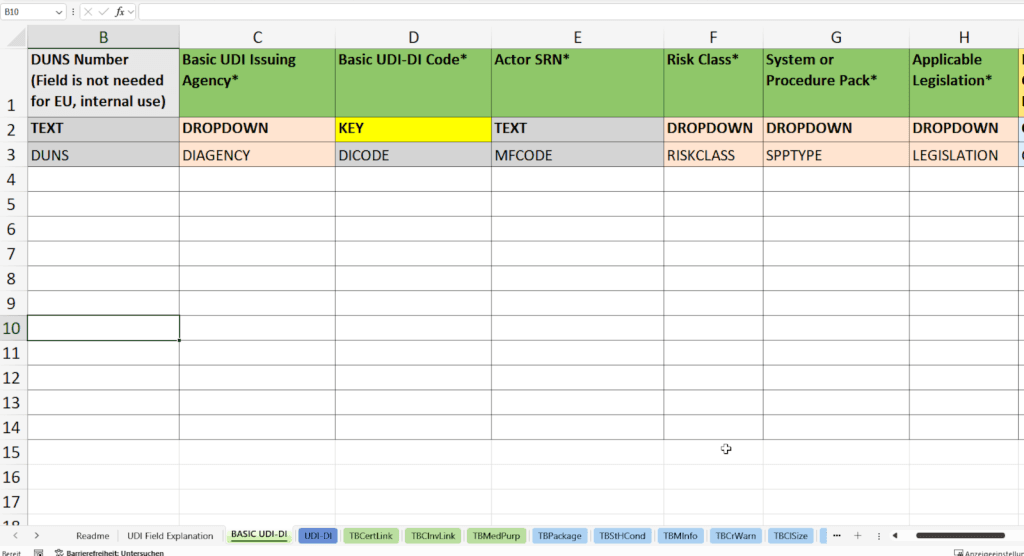
- Identifier and issuing agency: Basic UDI-DI Code and Basic UDI Issuing Agency, for example GS1, HIBCC or ICCBBA. You document the identifier assigned under the relevant allocation rules; the Excel file does not replace an issuing agency.
- Actor context: The manufacturer’s Actor SRN and, where required, the EU authorised representative’s SRN. Manufacturer and authorised representative must not be entered as interchangeable roles.
- Legislation and classification: Applicable Legislation, Risk Class and relevant System or Procedure Pack or Special Device Type entries. The selection must fit the MDR, IVDR or separately assessed legacy case.
- Name and model: Device Name and/or Device Model describing the product group.
- Device characteristics: Active Device, Measuring Function, administration function, Reusable Surgical Instrument and Implantable Device, where applicable.
- IVD characteristics: Companion Diagnostic, microbial components, Near-patient Testing, Self-testing, Instrument, Kit and Professional Testing.
- Biological components: Presence of Animal Tissues or Cells and Presence of Human Tissues or Cells.
Mandatory and conditionally required information depends on the product. Subsequent registration of a new Basic UDI-DI also requires an associated UDI-DI. European Commission: registering MDR/IVDR devices.
Does the template suit your product structure?
Please complete the form so we can prepare a suitable quotation.
UDI-DI: capture individual products and their characteristics
The UDI-DI worksheet contains individual product information and a reference to the parent Basic UDI-DI. Internal material references help reconcile entries with your existing data.
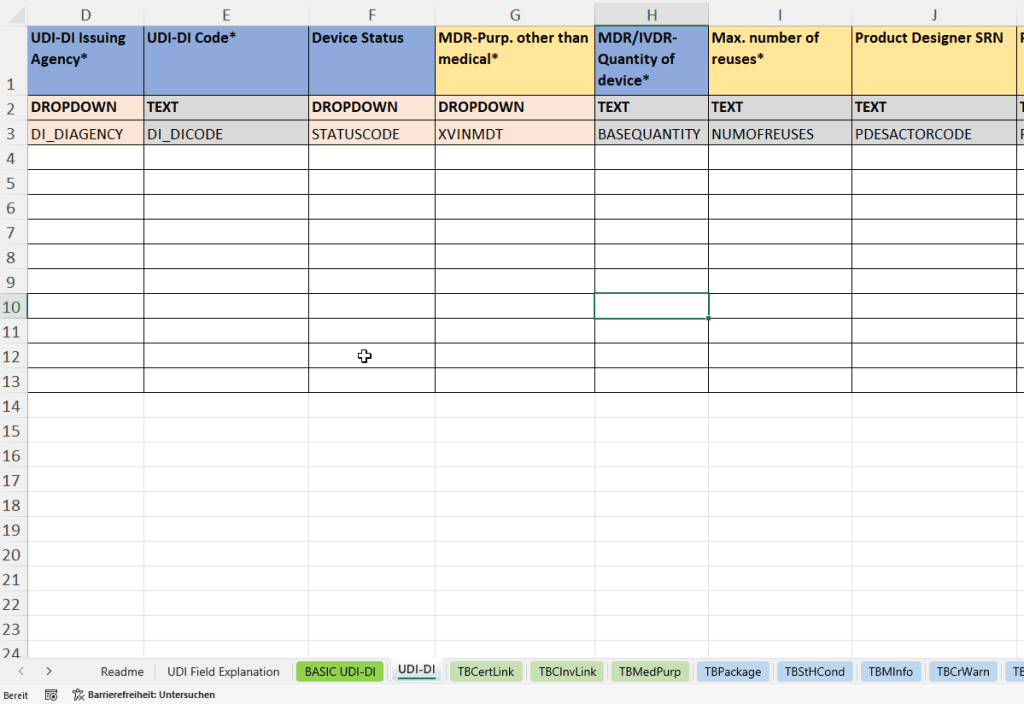
- Assignment and internal references: Parent Basic UDI DI Code, material number (Material) and material description (Material Text).
- Identification: UDI-DI Issuing Agency, UDI-DI Code, Reference Number and, where needed, Secondary Issuing Agency and Secondary UDI-DI Code.
- Status and use: Device Status, MDR Purpose Other Than Medical and the applicable IVDR New Device entry.
- Quantity and reuse: Quantity of Device, Max. Number of Reuses, Labelled as Single Use and Reprocessed Single-use Device.
- Product designer: Product Designer SRN and Product Designer ID, where relevant to the record.
- Direct marking: Direct Marking, DM DI Same as UDI-DI Code, DM Issuing Agency and DM DI Code.
- Sterility and material characteristics: Device Labelled as Sterile, Device Needs Sterilization Before Use and Containing Latex.
- Production identification: the UDI-PI types used, such as lot/batch number, serial number, manufacturing date, expiry date or software identification.
- Unit of Use DI: code and issuing agency for the unit of use, where required. Unit of Use DI is not simply an identifier for an additional packaging level.
- Further information: URL for additional product information or electronic instructions for use (eIFU).
The EU UDI Helpdesk: Unit of Use DI explains the relationship to the individual unit of use. Packaging has its own data area.
Certificates, clinical references and intended purpose
Certificate information
Certificate references are linked to the relevant Basic UDI-DI. The template describes the following entries:
- Basic UDI Code for assignment.
- Certificate No. and Certificate Revision No.
- Certificate Type from the predefined selection and the notified body’s NB Code.
- Expiry Date where provided for the relevant certificate or legacy case.
Documenting a certificate reference is not the same as issuing or registering a certificate with an authority.
Clinical investigation and medical purpose
- Clinical Investigation ID and Country for the relevant clinical reference.
- Language and Indication of Medical Purpose for language-specific medical purpose information.
The references intended for the record are maintained; these worksheets do not replace complete clinical documentation.
Traceably map packaging structure and handling
Packaging information — Packaging Hierarchy
The packaging worksheet links the product reference to each packaging identifier and its contents. Especially with multiple levels, parent and child identifiers must be consistent.
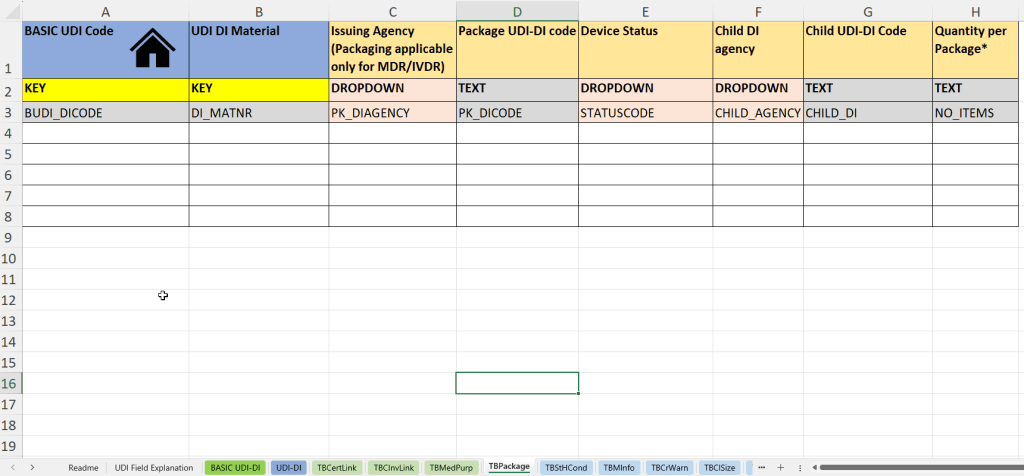
- Basic UDI Code and UDI DI Material for assignment.
- Packaging Issuing Agency and Package UDI-DI Code.
- Device Status according to the values specified for the field.
- Child DI Agency and Child UDI-DI Code of the contained product or lower packaging level.
- Quantity per Package describing the number contained.
Storage and handling conditions
- UDI DI Material linking to the relevant product.
- Storage & Handling Conditions Type from the intended selection.
- Language and Description for required language-specific explanations.
Prepare product data and packaging hierarchies
Please complete the form so we can prepare a suitable quotation.
Additional worksheets for markets, warnings and product details
Market information
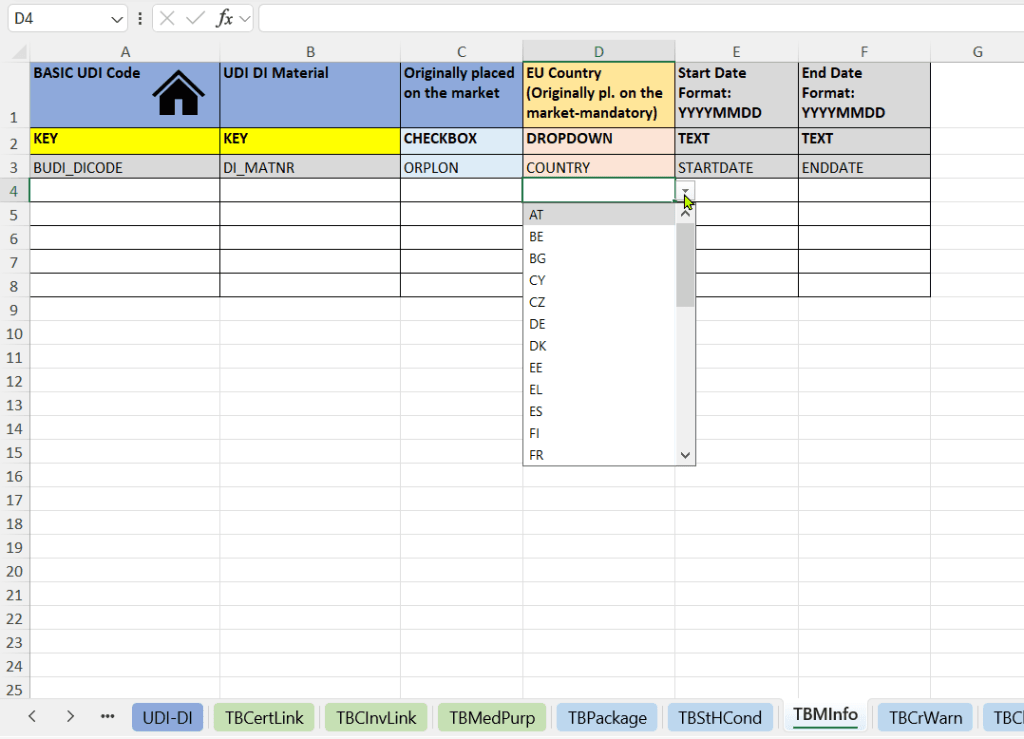
Entries include Originally Placed on the Market, the related EU Country, Start Date and End Date. These describe the specific market context; they should not be interpreted as a single worldwide launch date.
Critical warnings and size information
- Critical Warning Type: applicable warnings from the specified values.
- Size Type: the required size information format.
- Precision and Size Unit.
- Value or Min. Value and Max. Value.
Medicinal substances and substances derived from human blood or plasma
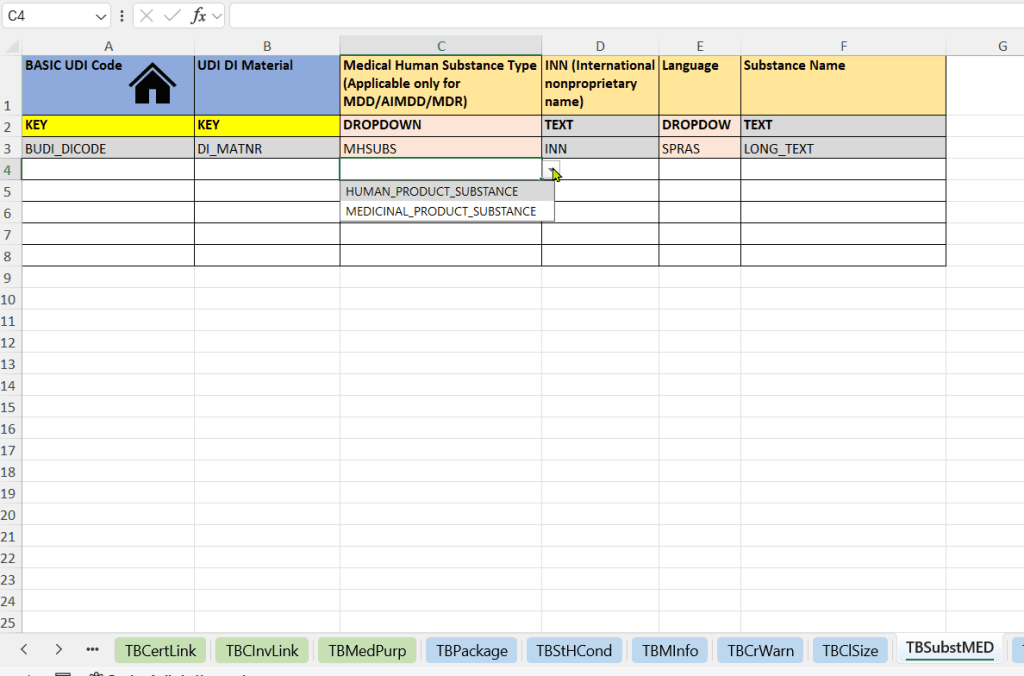
- Medical Human Substance Type: the substance category applicable to the product.
- INN (International Nonproprietary Name), where specified.
- Language and Substance Name for language-specific descriptions.
CMR and endocrine substances
- Substance type in the CMRENDSUBS field.
- CAS Code (CASCODE) and EC Code (ECCODE), where available or required.
- Language (SPRAS) and Substance Name as free text (LONG_TEXT).
Descriptions, trade names and nomenclature
- Additional Product Description: additional product description (DESCR) with language (SPRAS), for example function or composition.
- Trade Name: trade name (TRD_NAME) and associated language (SPRAS).
- EMDN Nomenclature: the Nomenclature Code substantively appropriate to the product.
Selecting a value or code assumes it is substantively appropriate to your product. A selection list does not make the specialist decision for you.
Discuss the template and required data areas
Please complete the form so we can prepare a suitable quotation.
Input aids that support your data work
Identify mandatory fields
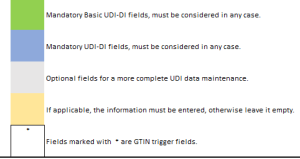
The colour legend distinguishes Basic UDI-DI fields, UDI-DI fields, optional and conditionally required entries. Markings and contextual input aids help you navigate.
Select values consistently
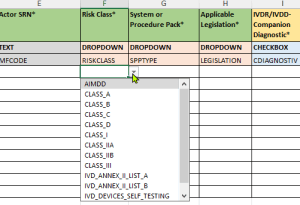
Predefined dropdowns support standardised entries. Relevant choices depend on factors including legislation, product type and classification.
Navigate directly to worksheets
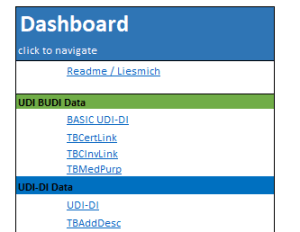
The dashboard, Readme/Liesmich and field explanations simplify navigation. German and English descriptions support teamwork.
Check dependencies and plausibility
The existing description lists integrated dependency and consistency checks, contextual fields and indications of possible inconsistencies. These input aids support preparation. They must be distinguished from final checks against the structures and rules applicable to submission.
The European Commission publishes the technical foundations in its European Commission: data definitions, XML schemas and business rules. A formally completed Excel file is not proof of successful EUDAMED registration.
File format, use and version status
For MDD/AIMDD/IVDD legacy data, identification logic, required fields and the specific workflow must be checked separately. Legacy choices visible in older screenshots are not a blanket promise for every present-day registration case.
Ask about version, updates and scope
Please complete the form so we can prepare a suitable quotation.
After data collection: which next step fits?
For the subsequent new MDR/IVDR registration, the Basic UDI-DI and the first associated UDI-DI are registered together. Separate worksheets in the template do not mean that the Basic UDI-DI is registered independently. European Commission: registering MDR/IVDR devices.
Explore the technical routes: EUDAMED M2M: prerequisites, workflow and feedback · EUDAMED XML bulk upload: file structure and limits.
The Excel template provides the basis for data preparation. Further processing depends on whether you need a defined XML project, a recurring portal process or UDI data management in SAP.
Validate Excel data and convert it to XML
Europe IT validates the completed data and creates XML files once detected errors are resolved. Conversion is a separate service, not an automatic export function of the template. On request, we handle manual XML upload to EUDAMED.
Transmit regularly from a portal
In the Global Submission Portal , the customer uploads the appropriate module template. Data is automatically pre-validated; the customer then triggers transmission. For EUDAMED, GSP uses M2M/Data Exchange. The template version used in each portal module must be agreed within the process.
Manage UDI data in SAP
GUDI is the Europe IT solution for UDI data management in SAP. The customer starts submission directly from GUDI and can work with status and authority feedback. This does not promise universal direct integration of every Excel file.
A fixed threshold of 20, 100 or 1,000 records does not determine the appropriate method. Further criteria are explained in the comparison of EUDAMED transmission methods. The European Commission: distinguishing XML upload and M2M explains the technical methods.
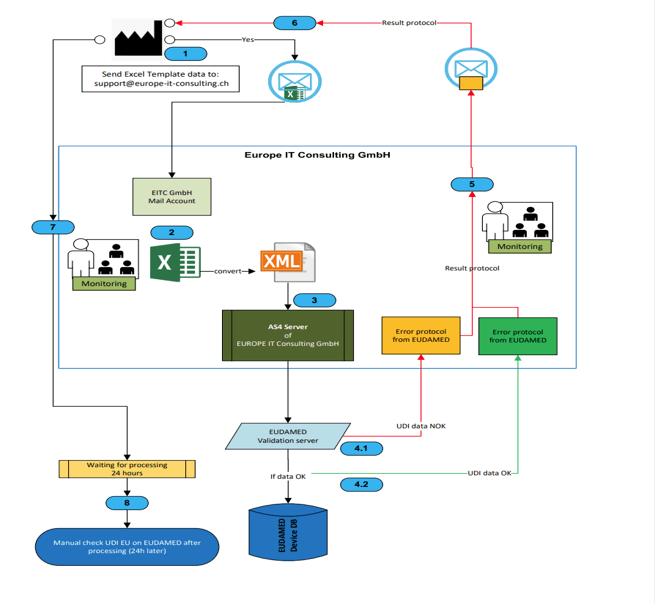
Existing process graphic: understanding the historical workflow
Historical illustration, not a current operating commitment: The retained graphic shows an email/AS4 workflow and a historical 24-hour check note. AS4 belongs to system exchange; the graphic does not explain manual XML upload. The time indication is not a guaranteed EUDAMED processing time. The workflow described above and agreed for your project is authoritative.
Frequently asked questions about the EUDAMED Excel template
Does the Excel template automatically generate EUDAMED XML?
No. The template is for structured data collection. Europe IT offers validation and XML conversion as separate services.
Can I upload the Excel file directly to EUDAMED?
The EUDAMED file upload described here uses XML, not the Excel template itself. In GSP, however, Excel upload is a portal step; EUDAMED transmission follows through the M2M process.
Can I manage multiple product families?
Yes. The structure supports multiple Basic UDI-DIs with related UDI-DIs. The key is consistent maintenance of links and supplementary worksheets.
Do I need advanced Excel skills?
The template is designed for users with basic Excel knowledge. Readme, field descriptions, dropdowns and colour legends support entry. Knowledge of your products and regulatory information is still required.
Which updates are included?
Have the version and update terms confirmed in the quotation. Providing an update does not mean that every working file already saved locally is automatically updated.
How do I protect the data I have entered?
Save the working file and traceable versions in your designated corporate environment. Backups and access rights follow your internal policies.
How are data transmitted after collection?
Depending on the commissioned process, separate XML generation with manual upload or a suitable Europe IT solution is used. Data source, product, transmission method and service scope are agreed separately.
Does the template guarantee full compliance?
No. The template and its input aids support preparation. Correct substantive information, the appropriate version, further validation and authority processing results must still be checked separately.
Start with a clear data structure
Europe IT Consulting develops the EUDAMED MDR/IVDR Excel template and combines data preparation with experience in UDI software and submission processes. What matters for your project is the data you have today, the information still missing and how the data should be processed next.
- Analyse: assess data sources, product types and existing EUDAMED registration status.
- Request the template: clarify version, usage scope, supply and updates.
- Capture data: maintain master data and supplementary information in the intended worksheets.
- Agree further processing: align additional validation, XML conversion and transmission with the operating model.
More about UDI data transmission with Europe IT and typical EUDAMED errors is available on the relevant specialist pages.
Request the EUDAMED Excel template and support
Please complete the form so we can prepare a suitable quotation.
Specialist sources and further information
The English-language primary sources explain authority requirements. The Europe IT template’s feature description is based on the supplied page content and product views; it is not a European Commission statement about this template.
- European Commission: registering MDR/IVDR devices
- European Commission: data definitions, XML schemas and business rules
- EU UDI Helpdesk: Unit of Use DI
- MDCG 2022-7: UDI for in vitro diagnostics, section G.2 (PDF)
- European Commission: distinguishing XML upload and M2M
Further official EUDAMED information and links · General EUDAMED FAQ
Editorial revision: . Please use the template and documentation versions current for your project.
