A powerful multi-authority workflow for regulatory teams
Global Submission Portal: UDI SaaS for EUDAMED and swissdamed
Complete the authority-specific Excel template, pre-validate data automatically, authorise submission yourself and track status and feedback centrally.
The Europe IT Consulting Global Submission Portal (GSP) is web-based SaaS and UDI submission software from Europe IT Consulting GmbH for medical device and IVD companies. It combines Excel import, data validation, customer approval, electronic submission, status tracking and authority feedback for EUDAMED, swissdamed, FDA GUDID and TGA AusUDID.
One controlled workflow instead of disconnected steps: Excel input → pre-validation → customer approval → submission → status and authority feedback. The customer confirms the valid upload and initiates submission; the Global Submission Portal displays file, record and authority statuses separately.
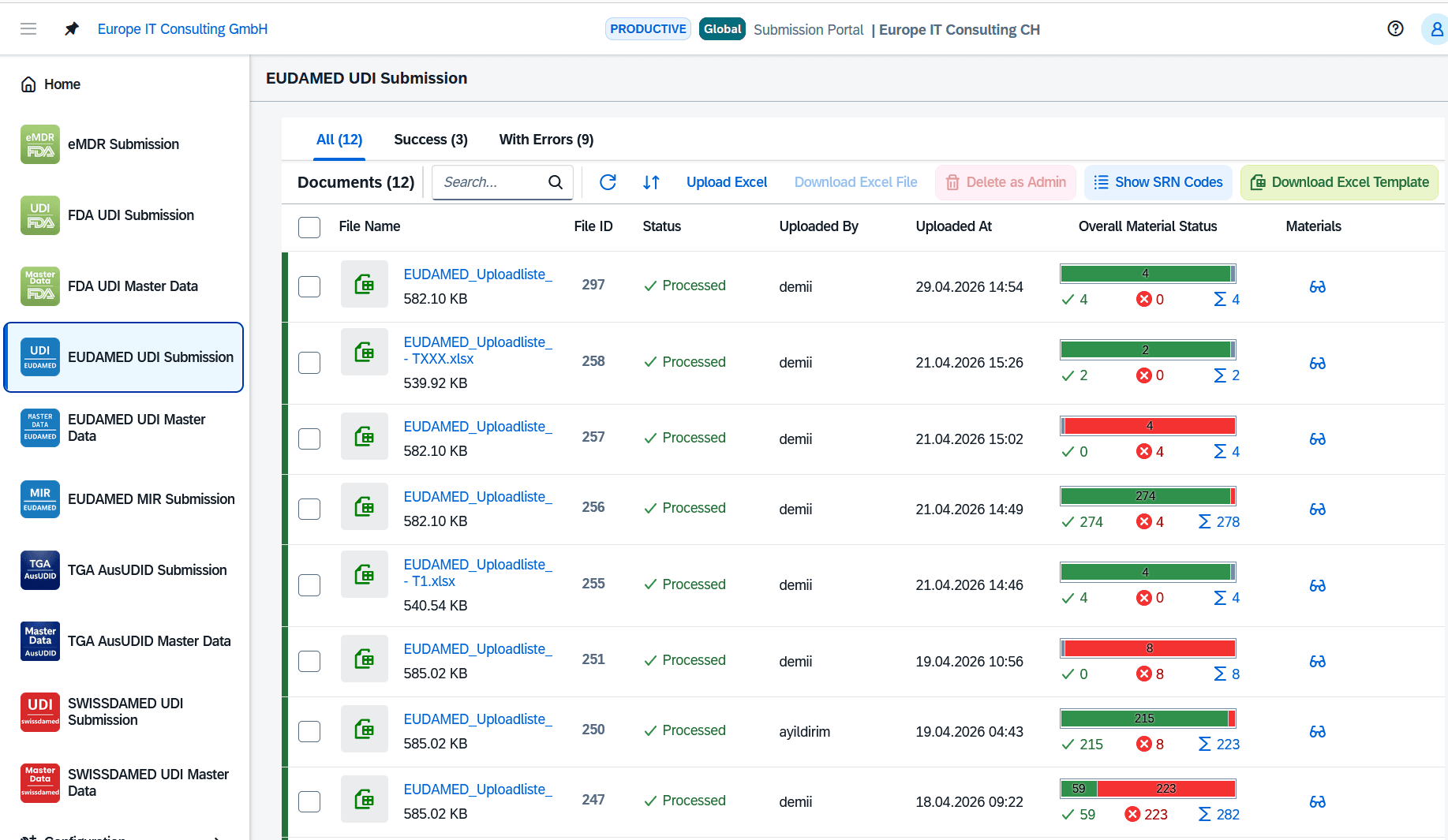
Excel input
Authority-specific templates for structured UDI and regulatory data.
Pre-validation
Find detectable errors before submission and correct them precisely.
The customer decides
Only the customer confirms the valid upload and starts submission.
Status in the portal
Track processing, record results and authority feedback.
The Global Submission Portal is designed for companies of any size seeking a flexible, web-based UDI submission solution. SAP is not required. UDI and regulatory data from existing sources and processes can be prepared for submission and processed in GSP.
The choice between GSP as a web-based SaaS solution and the SAP-integrated Global UDI SAP Add-on (GUDI) depends on the existing data and system environment and the preferred workflow.
EUDAMED M2M and swissdamed M2M in the Global Submission Portal
For EUDAMED, the Global Submission Portal supports electronic UDI submissions via M2M / Data Exchange. Following import, validation and customer approval, Europe IT’s infrastructure transmits the data; submission status and authority feedback can be reviewed in the portal.
For swissdamed, the Global Submission Portal supports automated electronic UDI submission through the swissdamed M2M interface. This interface uses a REST API with JSON; the solution prepares the data for the target process.
Transfer UDI data from EUDAMED to swissdamed
The Global Submission Portal (GSP) from Europe IT Consulting can synchronise UDI data from EUDAMED with swissdamed. GSP retrieves the existing EUDAMED data, processes and validates it for swissdamed, and submits the approved records through the swissdamed M2M interface. GSP performs the synchronisation; there is no direct connection between the two authority databases.
Why Europe IT Consulting?
Europe IT Consulting combines its own UDI software with regulatory consulting, data migration, technical troubleshooting, M2M integration and SAP expertise. Europe IT Consulting’s UDI solutions have already been used to transmit 500,000 UDI data records to regulatory authorities via M2M. Regulatory Affairs, Quality Management and IT teams can coordinate data structures, approvals and regulatory submissions through a single point of contact.
Europe IT Consulting Global Submission Portal (GSP)
Selected references for the Europe IT Consulting Global Submission Portal (GSP)
The Global Submission Portal is used in projects with companies of different sizes in the medical technology, dental and related sectors. Below you will find a selection of our GSP references. The customer statements that follow relate to the GSP, EUDAMED or SAP UDI projects described in each quotation.
 Medacta International
 JOTA AG Rotary Instruments
 UROMED Kurt Drews KG
 optimed Medizinische Instrumente GmbH
 Klaveness Footwear
 Perpedes GmbH
 LINCOTEK MEDICAL
 MEISINGER · Hager & Meisinger GmbH
 ChM sp. z o.o.
 Davis Schottlander & Davis Ltd
 EDENTA · Edenta Etablissement
- Burkart Medizintechnik AG
 EIZO GmbH
 BIP Biomedizinische Instrumente und Produkte GmbH
What customers say about working with us
Selected experiences from GSP, EUDAMED and SAP UDI projects. Each statement relates to the solution and collaboration described in the respective quotation.
“Europe IT Consulting’s UDI solution made our EUDAMED-compliant UDI process significantly easier. The implementation was efficient, and the team provided competent support for all regulatory requirements.”
“We are very satisfied with the support provided for our EUDAMED registrations. We particularly value the expertise, reliability and collaborative approach.”
“The implementation of the EUDAMED connection with Europe IT Consulting GmbH was smooth and professional. We especially appreciated the competent support and straightforward collaboration throughout the entire project.”
“With Europe IT Consulting’s UDI solution, we were able to structure and prepare the extensive UDI data for our product portfolio and make it available efficiently for the regulatory databases. We particularly value the expert support and reliable collaboration.”
“At seca, quality and efficiency come first. With the support of Europe IT Consulting GmbH …”
Show full customer statementClose customer statement
“At seca, quality and efficiency come first. With the support of Europe IT Consulting GmbH in SAP and Adobe form development, we have achieved a substantial improvement in both areas. The integration of their FDA and EUDAMED add-ons was a seamless process, and the benefits we gain from it are visible every day. A heartfelt thank-you to the Europe IT Consulting team for their outstanding work and support!”
“When the FDA introduced UDI requirements in 2016 with the Global Unique Device Identification Database (GUDID), we chose the solution …”
Show full customer statementClose customer statement
“When the FDA introduced UDI requirements in 2016 with the Global Unique Device Identification Database (GUDID), we chose a solution that enabled us to manage our UDI data independently in an SAP add-on, maintain it in SAP and transfer it from there to the database. Mr Demiralp and his team implemented this solution successfully, so we were more than satisfied then and remain so today. In connection with the UDI requirements of the European database for medical devices (EUDAMED), it was also important to us to continue this approach of independent data management and submission from SAP. We therefore chose Europe IT Consulting’s EUDAMED SAP Add-on this time as well.”
and others
→
Software selection questions
Is the Global Submission Portal a SaaS solution?
Yes. The Global Submission Portal is Europe IT Consulting GmbH’s web-based SaaS solution for UDI and regulatory submissions. Customers use it in a browser; an SAP installation or self-developed M2M infrastructure is not required.
Which software supports swissdamed M2M?
Europe IT Consulting GmbH provides the Global Submission Portal as a web-based SaaS solution for swissdamed UDI submissions. Data is imported, validated, approved by the customer and electronically submitted via swissdamed M2M. Processing status and available authority feedback can be reviewed in the portal.
Can existing EUDAMED UDI data be submitted to swissdamed?
The Global Submission Portal (GSP) from Europe IT Consulting can synchronise UDI data from EUDAMED with swissdamed. GSP retrieves the existing EUDAMED data, processes and validates it for swissdamed, and submits the approved records through the swissdamed M2M interface. GSP performs the synchronisation; there is no direct connection between the two authority databases.
Does the solution support initial registrations and later updates?
GSP supports initial registrations and subsequent updates within the relevant authority module. Changed records are checked; the customer approves resubmission and reviews the processing result.
When can the Global Submission Portal offer good value?
Assess value across software and setup costs, data preparation, subsequent updates and internal effort. GSP customers do not need to develop their own M2M infrastructure. A shared platform and data reuse can reduce duplicated work; the actual benefit depends on the agreed scope and the starting data.
When is Europe IT Consulting a strong fit?
The Global Submission Portal is a strong fit for companies that need to cover EUDAMED and swissdamed together, use Excel as a data source and reuse existing EUDAMED data for Switzerland. GUDI provides a separate option for ongoing UDI data management within SAP. Assess value across software and setup costs, data preparation, subsequent updates and internal effort. GSP customers do not need to develop their own M2M infrastructure. A shared platform and data reuse can reduce duplicated work; the actual benefit depends on the agreed scope and the starting data.
What is the Global Submission Portal?
Short answer: The Global Submission Portal combines Excel import, data checks, customer-controlled submission, error handling and status tracking in a web-based workflow. It is particularly suitable for structured, recurring or larger-volume UDI and regulatory data submissions when SAP-integrated UDI data management is not required.
Regulatory teams must handle different data structures, rules and responses for each target system. The Global Submission Portal provides module-specific workspaces and makes each stage visible, from the prepared Excel file to the result returned by the respective authority.
Structured Excel upload
The customer uses the Europe IT template appropriate to the licensed module. The file can be uploaded to the portal and processed for the intended submission workflow.
Detect errors before submission
Pre-validation identifies affected records, sections and rows with understandable messages. Error lists can be exported to Excel for correction.
Customer-initiated submission
After a successful check, the customer confirms the valid upload. Only this step triggers further processing and electronic submission.
Track files and records
The portal distinguishes the status of the uploaded file from individual record results and, where provided by the module, publication and authority feedback.
Process changes selectively
For subsequent uploads, the Global Submission Portal compares data with the stored version and can focus further processing on changed records.
Trace activities
The audit trail, exportable results and available technical artefacts support internal tracking of actions and submission steps.
Keep data source, solution, transmission method and operation separate
The Global Submission Portal is the user-facing workflow solution. Excel is the data source; M2M or the authority-specific electronic method provides the technical transport. These roles are not the same.
Data source
Completed, authority-specific Europe IT Excel template containing the required UDI or regulatory data.
Europe IT solution
Global Submission Portal for import, pre-validation, processing, customer authorisation, status, feedback and evidence.
Transmission method
Electronic, authority-specific submission process; for EUDAMED, the M2M/Data Exchange route.
Operating model
Web-based portal use for one-off, recurring or project-supported submissions.
When is the Global Submission Portal a good fit?
The appropriate submission option is not determined by a single record count. Data structure, relationships, quality, submission frequency, source system and the preferred operating model are decisive.
Typical Global Submission Portal use case
- The required data can be provided in a structured Excel template.
- Multiple or recurring submissions need to be processed in a controlled way.
- Validation, record status and authority feedback should be visible in one solution.
- Multiple licensed authority or reporting processes should be managed through one portal.
- An SAP installation or SAP-integrated UDI master data management is not required.
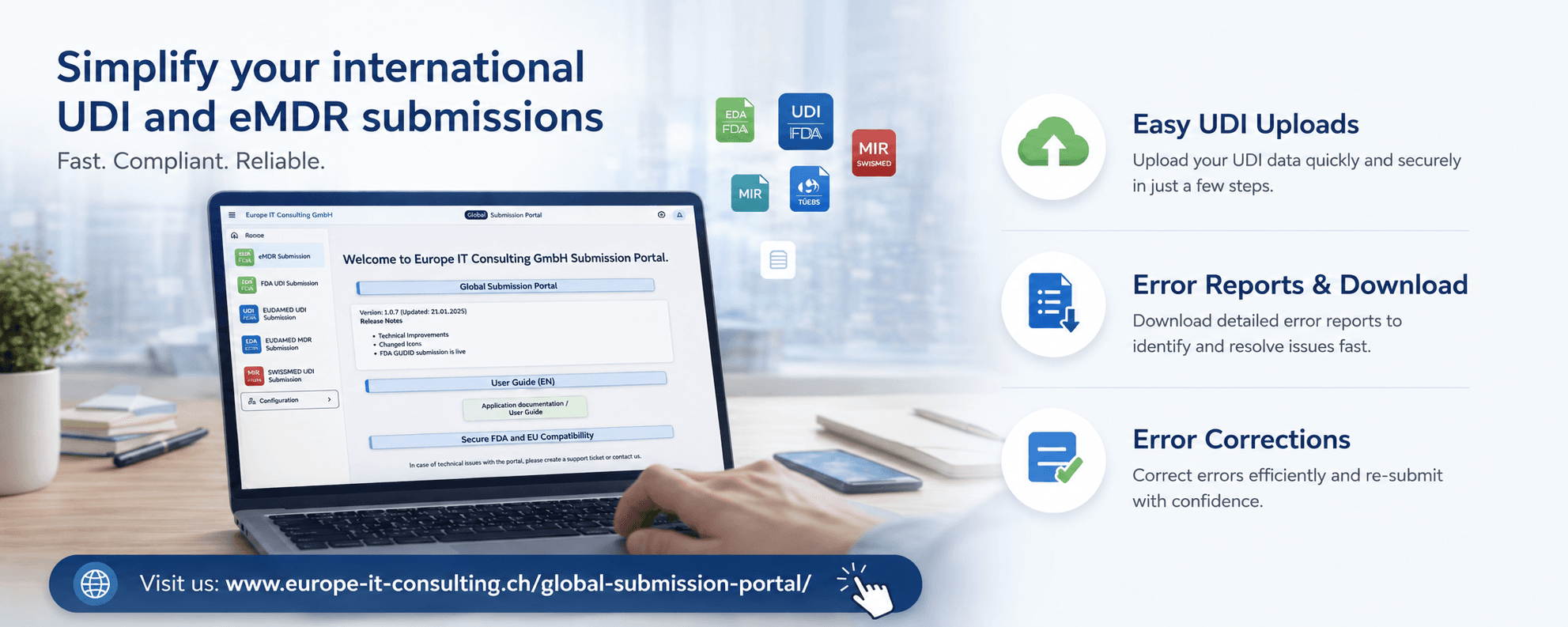
Does the Global Submission Portal fit your data and target authorities?
Tell us your data source, required modules, approximate volume and submission frequency. We will assess the appropriate process together.
How UDI submission works in the Global Submission Portal
The customer retains control over the operational workflow. Europe IT provides the portal, checking and submission process; each authority processes the submitted data in its own system.
1
Prepare data
Select the module and complete the Excel template
2
Check
Upload and automatic pre-validation
3
Authorise
The customer confirms and initiates submission
4
Track
Review status, errors and authority feedback
Select the authority module and template
Within the licensed module, the user downloads the current designated Excel template when needed.
Enter UDI or regulatory data
The customer transfers the required data from their sources and completes the module-specific template.
Upload the Excel file
The completed file is uploaded to the appropriate Global Submission Portal workspace. The portal passes it into the checking process.
Pre-validate data automatically
The Global Submission Portal checks imported information against the data structures and rules configured for the module. Detectable errors are displayed before submission.
Correct errors and upload again
The customer corrects substantive data errors in their template. Exportable error lists help locate the affected sections and rows precisely.
Confirm the valid upload
When pre-validation no longer reports blocking errors, the customer confirms the upload and clicks the designated submission action.
Process and submit electronically
The Global Submission Portal processes the authorised records and uses the technical submission process designated for the module. For EUDAMED, this is M2M/Data Exchange.
Review results and resubmit if necessary
Record statuses and available authority responses appear in the portal. The customer corrects the data and initiates any necessary resubmission themselves.
File status, record result and publication are three different things
This distinction is essential for a reliable status statement. A fully processed upload may contain successful, failed or unchanged records; even a successful record is not automatically already publicly published.
Example status sequence
File, record and publication statuses are interpreted separately. Available statuses depend on the module and authority process.
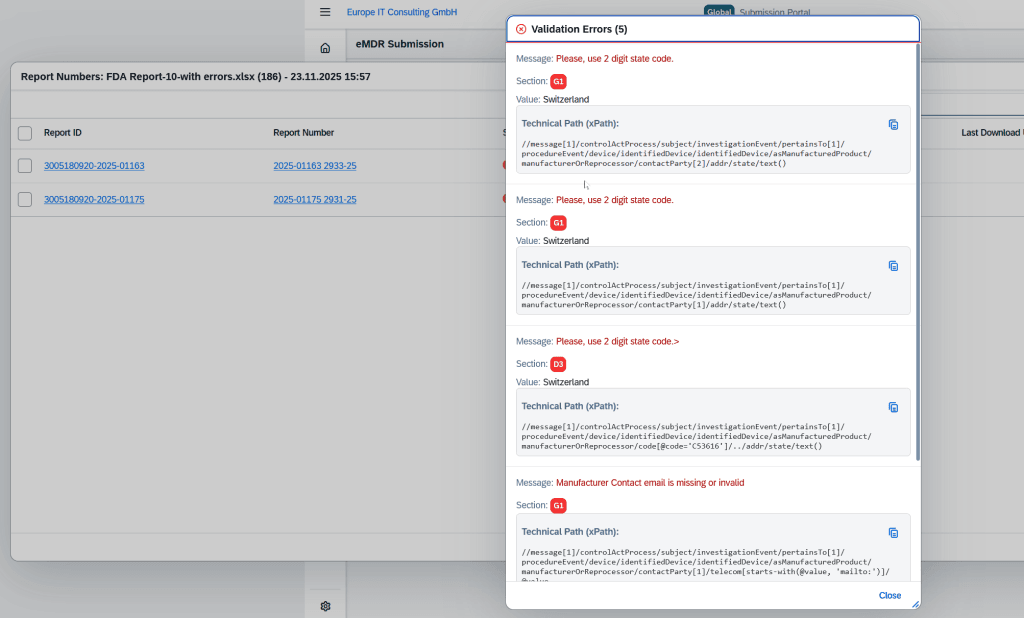
Present errors so they can be resolved
- Link to the affected record or material
- Indication of the section, worksheet or row
- Readable error message, plus technical details where authority responses are available
- Search and filters for larger result lists
- Excel export for correction and coordination
- After correction, a new upload and customer-initiated resubmission
For eMDR responses, for example, the Global Submission Portal can display the authority’s message and the technical XPath.
Repeat uploads, change detection and master data
Submission is not necessarily a one-off task. The portal can compare later datasets with stored information and provides dedicated master data views for supported UDI modules.
Available update capabilities
- Use the same template or a separate file for subsequent changes
- Identify new or changed records compared with the stored version
- Focus further processing on relevant changes
- Display Basic UDI-DI and UDI-DI separately in the EUDAMED module
- Review versions, assigned DIs, trigger lock, result, publication status and last error
The exact scope depends on the licensed authority module and the agreed process.
Supported authority and regulatory modules
Authority status: 4 September 2026. Four EUDAMED modules, including UDI/Device, have been mandatory since 28 May 2026. The European Commission still lists Vigilance/PMS as in development. A MIR feature in a Europe IT solution therefore does not establish a production EUDAMED reporting route. The reporting route applicable to the specific incident must be checked separately. European Commission: current module status · Prepare MIR data and identify the reporting route.
The Global Submission Portal provides module-specific templates, checks, workspaces and result views. Available modules depend on the current product scope and the agreed licence.
EUDAMED UDI
Prepare and pre-validate Basic UDI-DI and UDI-DI data, then submit through the EUDAMED M2M/Data Exchange process.
swissdamed UDI
For swissdamed, the Global Submission Portal supports automated electronic UDI submission through the swissdamed M2M interface. This interface uses a REST API with JSON; the solution prepares the data for the target process.
FDA GUDID
Import structured GUDID data, check and submit it, and track result statuses in the portal.
TGA AusUDID
Prepare and process Australian UDI data for the supported AusUDID workflow.
FDA eMDR
Process Electronic Medical Device Reports with a module-specific template, validation, technical feedback and download.
EUDAMED Vigilance / MIR
Prepare and process Manufacturer Incident Reports in the designated Global Submission Portal workspace. This does not promise production submission to the EUDAMED Vigilance module.
Which Global Submission Portal modules do you need?
Tell us the target authorities, data types and planned start date. We will explain the appropriate module and onboarding scope.
M2M through the Global Submission Portal and manual XML bulk upload are different processes
Explore the technical routes: EUDAMED M2M: prerequisites, workflow and feedback · EUDAMED XML bulk upload: file structure and limits.
Both methods can handle larger data volumes but have different user workflows and operating models. The Global Submission Portal also produces technical XML artefacts; this does not turn the process into manual XML bulk upload.
Global Submission Portal with electronic submission
- The customer works in the portal and initiates submission themselves.
- The Global Submission Portal processes records and uses the technical route designated for the module.
- Status, errors and available authority responses are displayed in the portal.
- Suitable for recurring submission workflows requiring controlled tracking.
Manual XML bulk upload
- Europe IT validates customer data and generates the required XML files.
- XML files are uploaded individually and manually through the EUDAMED upload process.
- File splitting follows the technical structures of the upload.
- For a new MDR/IVDR registration, the Basic UDI-DI and the first associated UDI-DI belong together; a Basic UDI-DI cannot be registered alone. XML file splitting depends on the registration operation, data structure and applicable technical limits. This does not establish a universal limit of 25 UDI-DIs or a fixed total of five files. European Commission: registering MDR/IVDR devices
Control over processing, evidence and publication gaps
Beyond import and submission, the Global Submission Portal supports operational tracking. The functions and responses available depend on the module.
Email after processing
After processing is complete, a notification can provide a volume overview and a downloadable summary.
XML and acknowledgements
XML files generated during the technical process and available receipt or result files can be downloaded for tracking.
Help and support
User guidance, module-specific help, support tickets and information on external target system status support daily work.
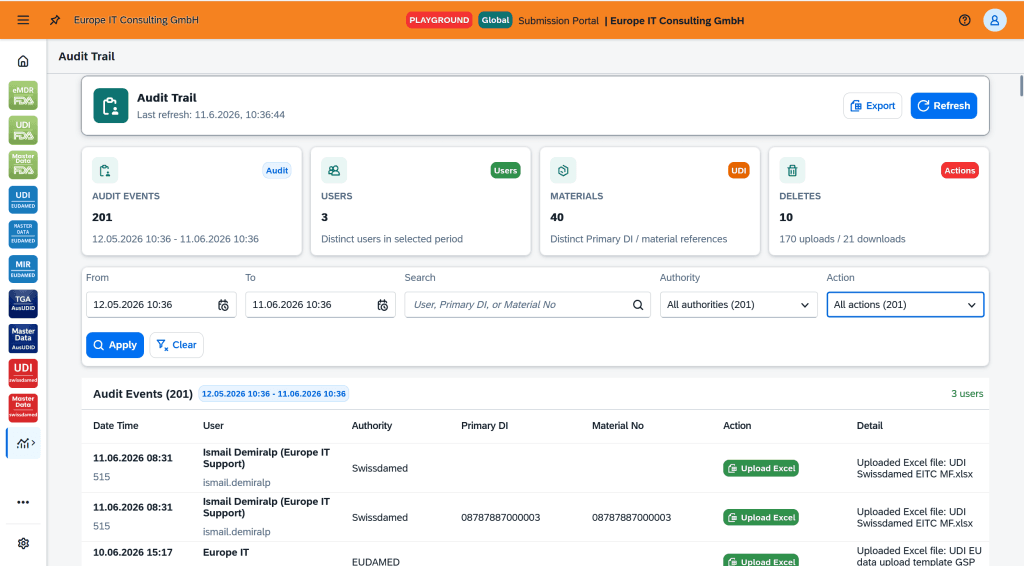
Audit trail
Relevant activities can be traced by date, time, user, authority, record reference, action and details. Filters and export support internal documentation and quality processes.
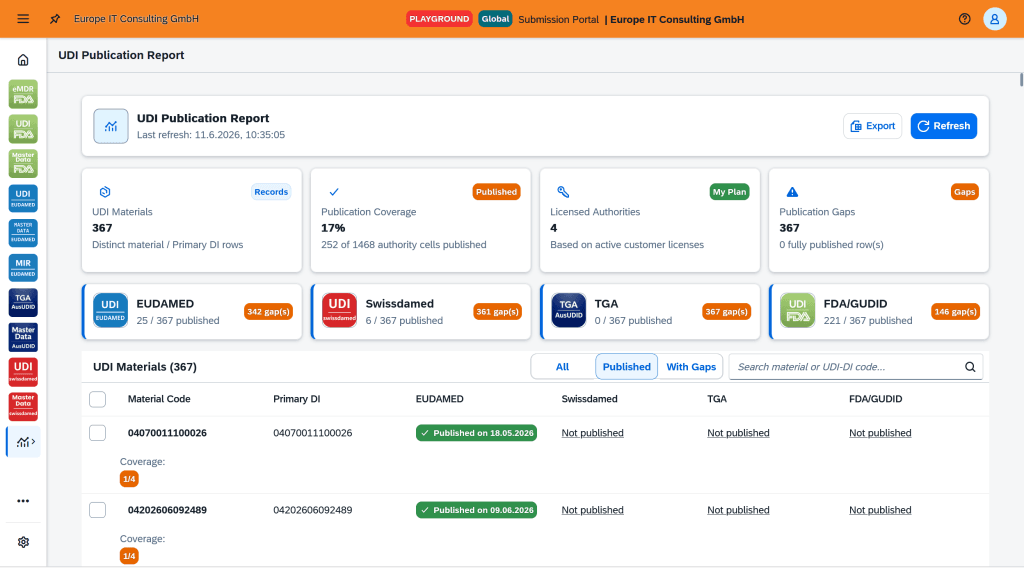
UDI Publication Report
For supported UDI modules, the report compares published records and identifies publication gaps. Material or Primary DI and authority can be analysed together.
Who is responsible for each step?
Clear roles prevent incorrect expectations of the portal, Europe IT and authority systems.
| Task | Responsible role | Operational significance |
|---|---|---|
| Collect data from source systems and complete the template | Customer | The customer is responsible for the content, completeness and substantive accuracy of their product data. |
| Pre-validation, portal processing and status display | Global Submission Portal / Europe IT | The portal checks and processes data within the scope of the respective module. |
| Authorise a valid upload and initiate submission | Customer | The authorised customer user deliberately initiates the operational process. |
| EUDAMED access point or gateway | Europe IT | Europe IT operates the submission service used for EUDAMED M2M communication. |
| Correct substantive data errors and initiate resubmission | Customer | Responses are reviewed in the portal; the customer remains responsible for content corrections and renewed authorisation. |
| Availability and processing in the authority database | Respective authority | The external target system and its operational status are not the responsibility of Europe IT. |
Onboarding, playground and go-live
Technical onboarding differs by authority and module. Europe IT implements the designated authority steps and provides the customer with the necessary instructions and documents.
Typical onboarding components
- Define required modules and user roles
- Clarify authority-specific registration and technical prerequisites
- Prepare the required authorisation documents, such as permission for M2M submission on behalf of the customer
- Agree the template, data scope, validation and correction workflow
- Document the submission and support process
The precise sequence follows the official requirements of the respective target system.
Test before production use
For supported modules, a clearly labelled playground or test area can be used. This allows the template, user workflow, validation and technical processing to be tested before production use.
A successful playground check is not a blanket guarantee of authority approval or continued availability of the external target system. Test scope and go-live are agreed for each module.
Global Submission Portal, Global UDI SAP Add-on, validator or XML service?
The solutions have different primary purposes. Selection depends on data source, desired data management, transmission method and operating model.
| Solution | Typical data source | Primary purpose | Submission | Suitable when … |
|---|---|---|---|---|
| Global Submission Portal | Authority-specific Excel template | Import, pre-validation, customer-controlled submission, status and feedback | Electronic; EUDAMED uses M2M/Data Exchange | a web-based multi-authority workflow is needed without installing SAP. |
| Global UDI SAP Add-on | SAP, with additional maintenance or Excel import | UDI master data management in SAP, plug-ins, validation, approval and submission | From the Global UDI SAP Add-on through the Europe IT submission service | UDI data is to be managed continuously within the SAP landscape. |
| UDI Excel Cloud Validator | Excel template | Check data before a planned submission and generate error reports | No authority submission | an independent pre-check is needed, rather than a submission workflow. |
| Manual XML bulk upload | Excel or other structured customer data, by agreement | Validation, XML generation and individual manual uploads as a service | Manual XML upload | project-based submission is planned without an ongoing portal workflow. |
GLOBAL SUBMISSION PORTAL PRODUCT DEMO
From Excel input to authority feedback: see the Global Submission Portal in action
See how an authority-specific Excel template becomes a controlled submission workflow: import and pre-validate data, obtain customer approval, submit it, and track results through to authority feedback.
If the embedded video is not displayed, open the Global Submission Portal demo directly on YouTube.
What the demo shows
- ImportSelect the module and upload the Excel file
- ChecksInvestigate errors and affected records
- StatusDistinguish file and record results
- FeedbackDownload responses and prepare corrections
Frequently asked questions about the Global Submission Portal
Short answers to common questions when choosing a UDI submission workflow.
What is the Global Submission Portal?
The Europe IT Consulting Global Submission Portal (GSP) is web-based SaaS and UDI submission software from Europe IT Consulting GmbH for medical device and IVD companies. It combines Excel import, data validation, customer approval, electronic submission, status tracking and authority feedback for EUDAMED, swissdamed, FDA GUDID and TGA AusUDID.
How are UDI data submitted using Excel?
The customer completes the Europe IT Excel template for the authority module and uploads it to the portal. After successful pre-validation, they confirm the valid upload, initiating further processing and submission.
Who initiates the final submission?
The customer. An uploaded file is pre-validated first. Once there are no blocking errors, the authorised user confirms the upload and starts submission in the Global Submission Portal.
Does the Global Submission Portal submit EUDAMED data through M2M?
Yes. The Global Submission Portal uses the M2M/Data Exchange route for EUDAMED. The Global Submission Portal is the user-facing workflow solution; M2M is the technical transmission method. Europe IT operates the EUDAMED access point or submission service used for this purpose.
Is M2M through the Global Submission Portal the same as XML bulk upload?
No. With M2M through the Global Submission Portal, the customer controls the submission workflow in the portal, where status and responses remain traceable. In the separate XML service, Europe IT validates supplied data, generates the required XML files and uploads them individually through EUDAMED’s manual upload process.
How does the Global Submission Portal display validation and authority errors?
Errors are displayed per record with the affected section and, where available, row, readable message and technical details. Lists can be searched, filtered and exported to Excel for correction.
Does “Processed” mean the data has been published?
No. “Processed” describes completed processing of an upload. Whether individual records were successful and are considered published by the authority must be checked using the separate record and publication statuses.
Who corrects errors and initiates resubmission?
The customer corrects the substantive data in their template, uploads the new version and initiates resubmission after a successful check. The Global Submission Portal provides error and status information for this purpose.
Can later changes be submitted using the same Excel template?
Yes. Later uploads can use the same template or a separate file. The Global Submission Portal can detect changes against the stored version and focus further processing on changed records.
Which authority modules does the Global Submission Portal support?
Depending on the current, agreed product scope, support may include EUDAMED UDI, swissdamed UDI, FDA GUDID, TGA AusUDID, FDA eMDR and preparation of MIR data. Specific availability is confirmed in the quote or during onboarding. As of 4 September 2026, the European Commission still lists the EUDAMED Vigilance/PMS module as in development, so the applicable reporting route must be checked separately.
Is the Global Submission Portal useful for small data volumes too?
This does not depend on a fixed record threshold. Data structure, frequency, relationships, validation needs and the desired workflow generally matter more than the raw number of UDI-DIs.
What is the difference between the Global Submission Portal and the Global UDI SAP Add-on?
The Global Submission Portal is a web-based submission portal typically using Excel as input. The Global UDI SAP Add-on is an SAP-integrated UDI add-on for ongoing UDI data management, authority plug-ins, approvals and submission from the customer’s SAP landscape.
See the Global Submission Portal live
We demonstrate the appropriate workflow based on your target authorities, data structure and planned use, including the template, pre-validation, customer authorisation, status and correction process.
Define the right submission route together
Together, we assess whether the Global Submission Portal, the Global UDI SAP Add-on, the validator or a manual XML process fits your data and operational needs.