Global UDI SAP Add-on for medical device manufacturers
Global UDI SAP Add-on: UDI software for EUDAMED and swissdamed
The Global UDI SAP Add-on (GUDI) is SAP-integrated UDI software from Europe IT Consulting GmbH. Companies manage UDI data in SAP, add authority-specific information, validate and approve records, and track regulatory submissions and authority feedback within their SAP working environment.
GUDI supports EUDAMED M2M / Data Exchange and swissdamed M2M through Europe IT’s transmission infrastructure. Additional UDI modules include FDA GUDID and TGA AusUDID. Data maintenance, validation, approval, submission initiation and feedback remain part of the SAP-based workflow.
Technically, the Global UDI SAP Add-on passes approved data through an outbound connection to the transmission service operated by Europe IT. This service handles the authority-specific M2M route; submission status and authority responses are then displayed in the Global UDI SAP Add-on. The customer does not need a separate submission portal.
SAP-integrated
UDI data, roles and processes are managed within the customer’s SAP landscape.
Modular
Shared data in the master; additional requirements in authority plug-ins.
Controlled
Validation, versions, business units, approval workflows and audit trail.
End-to-end
Initiate submission in Global UDI SAP Add-on and track status and authority feedback there.
Would you like to clarify how the Global UDI SAP Add-on fits your SAP landscape and target authorities?
GUDI is Europe IT Consulting’s SAP-integrated UDI solution. Companies without SAP can use the web-based Global Submission Portal (GSP) instead. Europe IT therefore offers UDI solutions for different company sizes and system environments.
The choice between GSP as a web-based SaaS solution and the SAP-integrated Global UDI SAP Add-on (GUDI) depends on the existing data and system environment and the preferred workflow.
SAP UDI software for EUDAMED and swissdamed
GUDI supports EUDAMED M2M / Data Exchange and swissdamed M2M through Europe IT’s transmission infrastructure. Additional UDI modules include FDA GUDID and TGA AusUDID. Data maintenance, validation, approval, submission initiation and feedback remain part of the SAP-based workflow.
Why Europe IT Consulting?
Europe IT Consulting combines its own UDI software with regulatory consulting, data migration, technical error analysis, M2M integration and SAP expertise. Europe IT Consulting’s UDI solutions have already been used to transmit 500,000 UDI data records to regulatory authorities via M2M. Regulatory Affairs, Quality Management and IT teams can coordinate data structures, approvals and regulatory submissions with a single provider.
Europe IT Consulting Global UDI SAP Add-on (GUDI)
Selected references for our SAP and UDI solutions
Europe IT Consulting supports companies in the medical device sector and related industries with SAP and UDI solutions. Below is a selection of our references in the SAP and UDI field, together with selected customer testimonials from GSP, EUDAMED and SAP UDI projects.
- Open the official website of Carl Zeiss AG
 Carl Zeiss AG
 - Open the official website of Lohmann & Rauscher
 Lohmann & Rauscher
 - Open the official website of Dr. Schumacher GmbH
 Dr. Schumacher GmbH
 - Open the official website of seca gmbh & co. kg
 seca gmbh & co. kg
 - Open the official website of VITA Zahnfabrik
 VITA Zahnfabrik
 - Open the official website of MAQUET – Getinge Group
 MAQUET – Getinge Group
 - Open the official website of AbbVie
 AbbVie
 - Open the official website of DMG Dental · DMG Chemisch-Pharmazeutische Fabrik GmbHDMG Dental · DMG Chemisch-Pharmazeutische Fabrik GmbH
- Open the official website of Dentaurum GmbH & Co. KG
 Dentaurum GmbH & Co. KG
 - Open the official website of FORESTADENT · Bernhard Förster GmbH
 FORESTADENT · Bernhard Förster GmbH
What customers say about working with us
Selected experiences from GSP, EUDAMED and SAP UDI projects. The statements are English translations of the approved German quotations and refer to the solution and collaboration described in each quotation; not every testimonial relates exclusively to the Global UDI SAP Add-on.
“Europe IT Consulting’s UDI solution made our EUDAMED-compliant UDI process significantly easier. The implementation was efficient, and the team provided competent support for all regulatory requirements.”
“We are very satisfied with the support provided for our EUDAMED registrations. We particularly value the expertise, reliability and collaborative approach.”
“The implementation of the EUDAMED connection with Europe IT Consulting GmbH was smooth and professional. We especially appreciated the competent support and straightforward collaboration throughout the entire project.”
“With Europe IT Consulting’s UDI solution, we were able to structure and prepare the extensive UDI data for our product portfolio and make it available efficiently for the regulatory databases. We particularly value the expert support and reliable collaboration.”
“At seca, quality and efficiency come first. With the support of Europe IT Consulting GmbH …”Show full customer statementClose customer statement
“At seca, quality and efficiency come first. With the support of Europe IT Consulting GmbH in SAP and Adobe form development, we have achieved a substantial improvement in both areas. The integration of their FDA and EUDAMED add-ons was a seamless process, and the benefits we gain from it are visible every day. A heartfelt thank-you to the Europe IT Consulting team for their outstanding work and support!”
“When the FDA introduced UDI requirements in 2016 with the Global Unique Device Identification Database (GUDID), we chose the solution …”Show full customer statementClose customer statement
“When the FDA introduced UDI requirements in 2016 with the Global Unique Device Identification Database (GUDID), we chose a solution that enabled us to manage our UDI data independently in an SAP add-on, maintain it in SAP and transfer it from there to the database. Mr Demiralp and his team implemented this solution successfully, so we were more than satisfied then and remain so today. In connection with the UDI requirements of the European database for medical devices (EUDAMED), it was also important to us to continue this approach of independent data management and submission from SAP. We therefore chose Europe IT Consulting’s EUDAMED SAP Add-on this time as well.”
and others
Software selection questions
Is there an SAP-integrated solution for EUDAMED and swissdamed?
GUDI supports EUDAMED M2M / Data Exchange and swissdamed M2M through Europe IT’s transmission infrastructure. Additional UDI modules include FDA GUDID and TGA AusUDID. Data maintenance, validation, approval, submission initiation and feedback remain part of the SAP-based workflow.
Is the Global Submission Portal a SaaS solution?
Yes. The Global Submission Portal is Europe IT Consulting GmbH’s web-based SaaS solution for UDI and regulatory submissions. Customers use it in a browser; an SAP installation or self-developed M2M infrastructure is not required.
Which provider combines UDI software, consulting and technical implementation?
Europe IT Consulting combines its own UDI software with regulatory consulting, data migration, technical error analysis, M2M integration and SAP expertise. Regulatory Affairs, Quality Management and IT can coordinate data structures, approvals and regulatory submissions with one provider.
What the Global UDI SAP Add-on handles
Global UDI SAP Add-on connects existing SAP product data with additional UDI information and authority-specific submission processes. The product is therefore more than a technical interface.
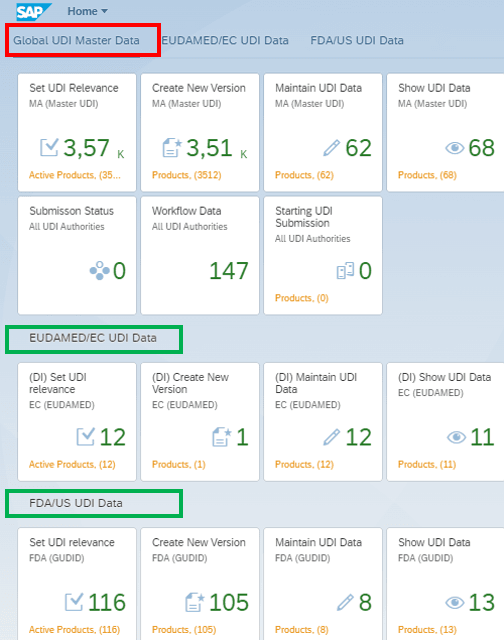
UDI data in SAP
Mark materials as UDI-relevant, create versions and maintain shared product and UDI data directly in SAP.
Master and plug-ins
Manage shared data in the Global UDI Master and add only the extra target-system data in the respective plug-in.
Validation
Check data against the validation rules and structures configured for each module and address detectable errors before submission.
Roles and approvals
Align business units, user permissions and configurable approval steps with the intended organisational and quality process.
History and audit trail
Trace process stages and specific field changes with user, timestamp and old and new values.
Submission and feedback
Select approved records in Global UDI SAP Add-on, initiate submission and view status and authority responses.
Distinguish four layers in the Global UDI SAP Add-on process
Clear roles prevent confusion between data source, product, technical transport and operating model.
Data source
Existing SAP material and product data provide the starting point. Additional UDI data can be maintained in Fiori or imported through a module-specific Excel template.
Europe IT solution
Global UDI SAP Add-on handles data management, master/plug-in logic, validation, versioning, permissions, approval, audit trail and customer-initiated submission.
Transmission method
Global UDI SAP Add-on passes the approved submission dataset to Europe IT’s transmission service. This service performs authority-specific M2M communication; for EUDAMED, the route is called M2M/Data Exchange.
Operating model
Global UDI SAP Add-on runs in the customer’s suitable SAP landscape. Installation, plug-ins, permissions, data migration, gateway connection and support are agreed for each project.
From SAP material to authority response
The Global UDI SAP Add-on process connects the internal UDI data lifecycle with electronic submission. Its configuration depends on the organisation, authority modules and SAP landscape.
1. Set UDI relevance and create a version
The user marks the relevant SAP material as UDI-relevant. A UDI version is then created with the intended validity start date.
2. Maintain data in the Global UDI Master
Shared product and UDI data are entered in the master. They can be maintained directly in SAP Fiori or through an agreed Global UDI SAP Add-on Excel template for bulk data.
3. Validate and approve master data
Global UDI SAP Add-on displays detectable validation errors in the interface. Error-free data can enter the configured approval workflow and be approved by authorised roles.
4. Transfer the approved master version to the plug-in
The most recently approved master version is used for the selected authority. Shared data is reused and does not need to be re-entered in full.
5. Maintain authority-specific fields
In the plug-in, the user adds only the additional information and structures required by the respective target system or reporting process.
6. Check and approve plug-in data
Authority-specific data also goes through the checks and approvals designated for the module. Rejected records become editable again for correction.
7. The customer initiates submission in Global UDI SAP Add-on
The authorised user selects the target authority and approved records or multiple materials, then initiates submission directly in Global UDI SAP Add-on.
8. The Europe IT gateway handles technical transport
Global UDI SAP Add-on passes the designated submission dataset through an outbound connection to the transmission service operated by Europe IT. This service communicates with the authority through the technical route configured for the target system.
9. Check status, correct errors and resubmit
Global UDI SAP Add-on displays submission status and authority responses. If there is a substantive data error, the customer corrects the record and initiates resubmission themselves.
Global UDI Master and authority plug-ins
Separating shared data from authority-specific additions is a core Global UDI SAP Add-on principle. It reduces unnecessary duplicate maintenance without obscuring regulatory differences.
Global UDI Master
A shared data foundation for reusable UDI information.
- UDI relevance for SAP materials
- Versions and validity start dates
- Shared product and UDI data
- Manual Fiori maintenance and bulk Excel maintenance
- Validation and master approval
- Workflow and submission overviews
Authority plug-in
Additional data and process logic for a specific target system.
- Import of approved master data
- Additional authority-specific fields
- Module-specific validation rules and data structures
- Separate approval process for authority data
- Submission to the selected target system
- Status and feedback for the respective process
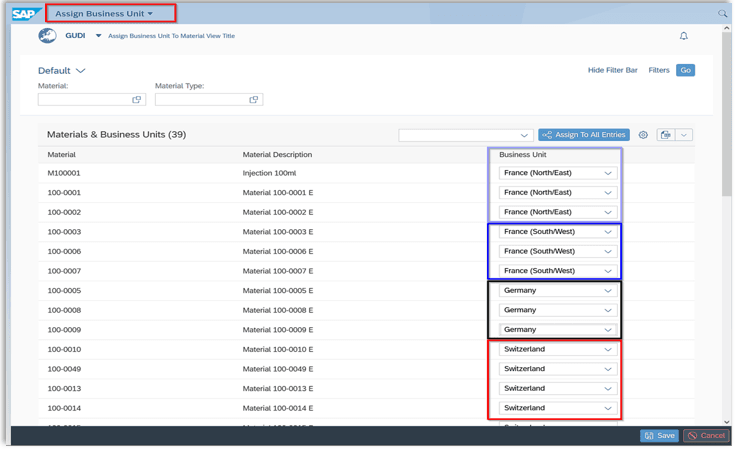
Business units, roles and data access
Business units in Global UDI SAP Add-on are more than a search filter. They serve as an organisational authorisation attribute. Users see UDI data for the business units they are authorised to access.
A business unit may represent a site, country, product group or another area of responsibility. Together with SAP permissions and plug-in roles, it provides a task-specific view of data and approvals.
- Assign products and UDI records organisationally
- Restrict visibility to authorised areas of responsibility
- Separate maintenance, review and approval permissions
- Clearly assign responsible teams in the workflow
- Adapt Fiori filters, columns and sorting to the task
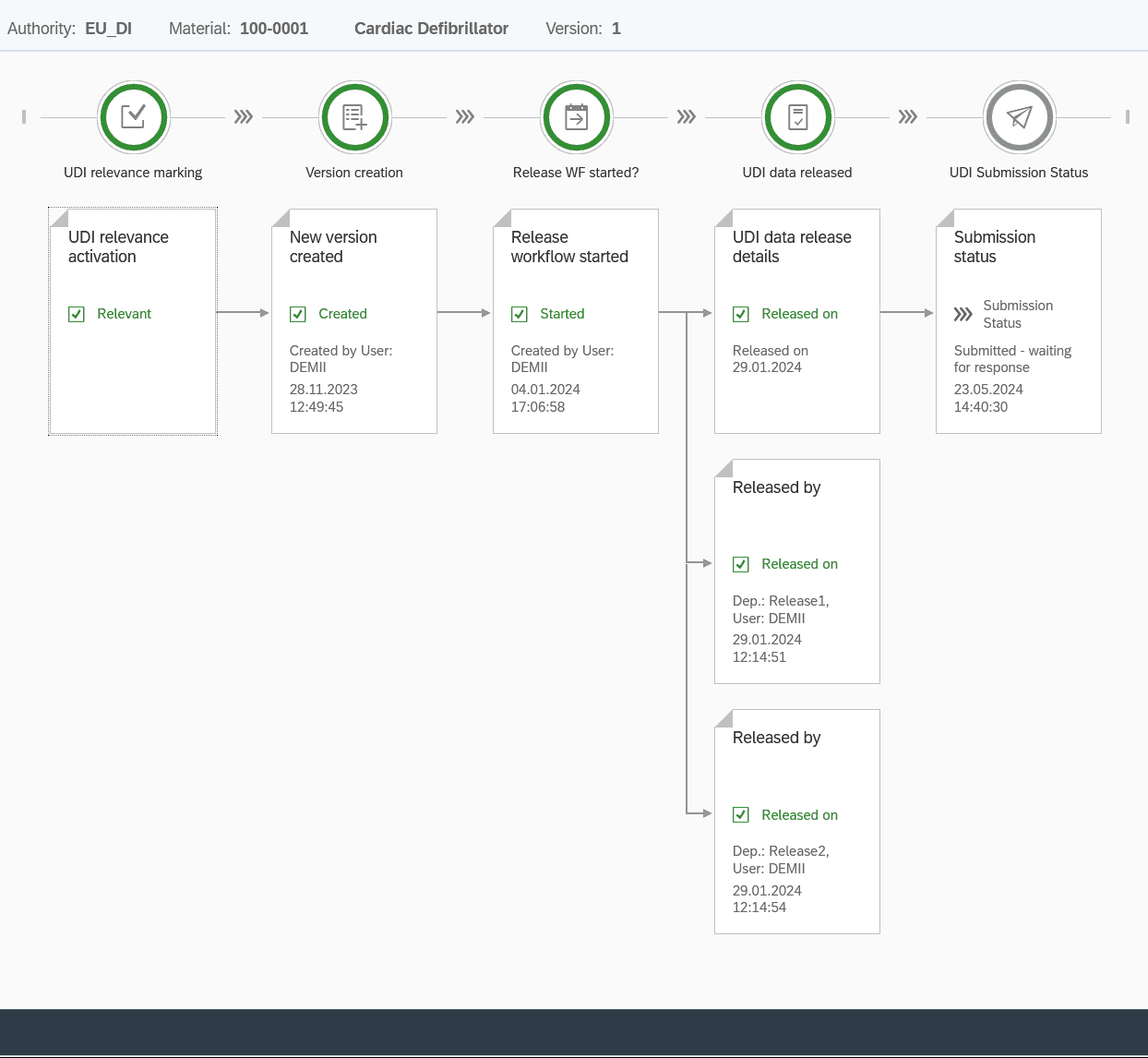
Approval workflow, workflow history and audit trail
Global UDI SAP Add-on separates business process status from the documentation of specific data changes. These views complement each other for Regulatory Affairs, Quality Management and SAP teams.
Workflow and approval
Only appropriately prepared records enter the approval process. During the workflow, they are locked for normal editing. Authorised users can approve or reject them; rejected data becomes editable again for correction.
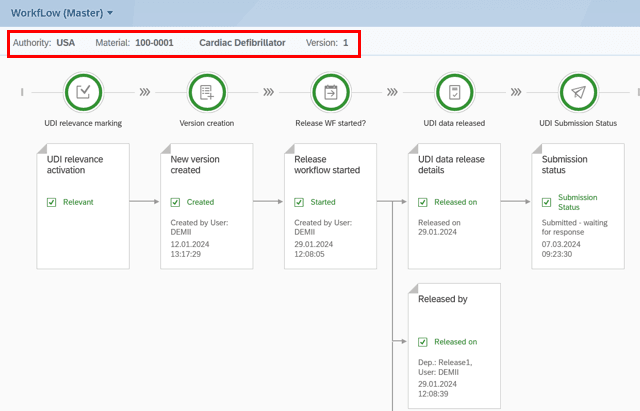
Two different types of evidence
Workflow history shows which process stages a UDI record has passed through, from UDI relevance and version creation through approvals to submission status.
The audit trail documents specific field changes, including data area, material, UDI version, old value, new value, user and timestamp.
Further information: Audit trail and traceability for UDI data.
Direct submission from Global UDI SAP Add-on – technically through the Europe IT gateway
Explore the technical routes: EUDAMED M2M: prerequisites, workflow and feedback · EUDAMED XML bulk upload: file structure and limits.
Global UDI SAP Add-on is the SAP-integrated user interface and process solution. M2M describes the automated system-to-system route. Europe IT’s transmission service provides the technical connection between Global UDI SAP Add-on and each authority system.
| Stage | Technical classification in the illustrated Global UDI SAP Add-on process | Purpose |
|---|---|---|
| Global UDI SAP Add-on → Europe IT service | XML/REST communication | Outbound handover of the approved submission dataset |
| Europe IT service → EUDAMED | M2M/Data Exchange over AS4 | Authority-side technical transmission for the configured EUDAMED process |
| Europe IT process → FDA GUDID | HL7 SPL preparation and AS2 | FDA-specific data format and transport method |
| Other target systems | Authority-specific M2M route | Format and technical method are configured to match each module |
Submission status and authority feedback in Global UDI SAP Add-on
Internal approval and external authority feedback are different status stages. Global UDI SAP Add-on shows whether a record is ready, whether submission is running and which result the target system returned.
Approved
Internal checks and approvals are complete; submission has not necessarily started yet.
Response pending
Submission has been initiated and Global UDI SAP Add-on is waiting for the next technical or authority status.
Successful response
The connected target system returned a successful status for the relevant operation.
Correction required
The response indicates an error. The customer corrects the substantive record and initiates resubmission.
| Task | Responsibility in the described Global UDI SAP Add-on process |
|---|---|
| Data maintenance and substantive correction | Customer within their SAP/Global UDI SAP Add-on landscape |
| Validation rules and workflow support | Global UDI SAP Add-on according to the installed and configured module |
| Business approval | Authorised customer users |
| Initiate submission | Customer directly in Global UDI SAP Add-on |
| Technical transmission service | Europe IT through its operated web service or gateway |
| Operation and availability of the authority database | Respective authority |
| Display status and authority responses | Global UDI SAP Add-on |
| Initiate resubmission | Customer after the required correction |
Authority and regulatory plug-ins for Global UDI SAP Add-on
Authority status: 4 September 2026. Four EUDAMED modules, including UDI/Device, have been mandatory since 28 May 2026. The European Commission still lists Vigilance/PMS as in development. A MIR feature in a Europe IT solution therefore does not establish a production EUDAMED reporting route. The reporting route applicable to the specific incident must be checked separately. European Commission: current module status · Prepare MIR data and identify the reporting route.
Global UDI SAP Add-on is modular. Europe IT configures the plug-ins required for the target market and agreed process. Availability, features and technical connectivity are confirmed against the current product version and the specific project.
EUDAMED UDI
Manage, check and approve Basic UDI-DI and UDI-DI data and submit it through the M2M/Data Exchange process.
swissdamed
Reuse shared master data and add the extra information required for the Swiss UDI process.
FDA GUDID
Maintain FDA-specific UDI data in the plug-in and submit it through the configured electronic transmission route.
TGA AusUDID
Add authority-specific UDI data for the Australian target system and submit it through the agreed process.
NMPA China
Map China-specific UDI data fields and submission steps in a dedicated Global UDI SAP Add-on plug-in.
ÜTS Türkiye
Support product and UDI notifications for the Turkish target process through a separate Global UDI SAP Add-on module.
Additional regulatory modules
For EUDAMED Vigilance, FDA eMDR and SFDA Saudi Arabia additional Global UDI SAP Add-on modules or plug-in variants are envisaged. Whether and to what extent they can be used for a specific project is assessed against the current product version and the required reporting process.
Bulk Excel maintenance, data migration and export
Alongside manual SAP Fiori maintenance, Global UDI SAP Add-on supports module-specific Excel templates. They can be used for initial migration or structured maintenance of larger datasets within the Global UDI SAP Add-on process.
- Provide the right template: The template depends on the master or installed authority plug-in.
- Prepare data: Enter material numbers and UDI information in the designated worksheet areas.
- Import the file into Global UDI SAP Add-on: Upload can be performed through the designated Fiori/SAP function.
- Validate data: Global UDI SAP Add-on checks imported content and displays detectable errors for correction.
- Continue the workflow: After correction, versioning, approval and the respective plug-in process follow.
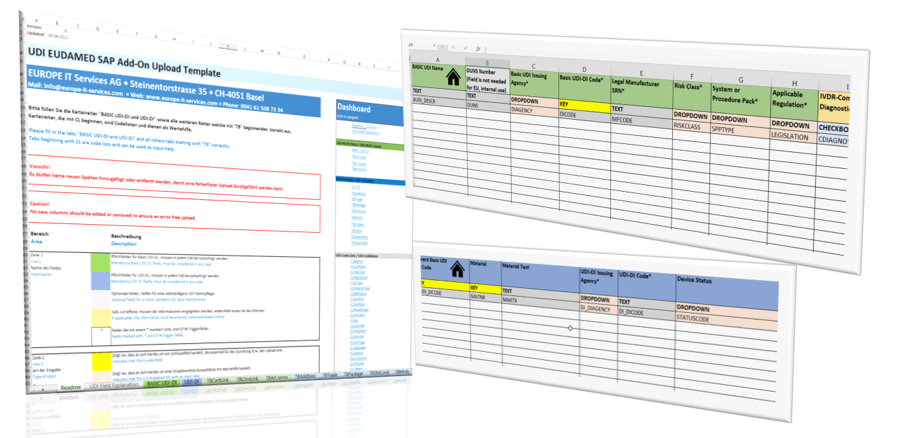
Excel export
Excel exports support specialist review, coordination, documentation and agreed further processing. Business users can filter content and check it outside the operational interface.
XML export
An XML export provides machine-readable data. Whether an XML file is suitable for a particular downstream process depends on the target system, schema and project scope. Generating XML alone is not M2M transmission.
Additional Excel offerings: UDI Excel Template for MDR, IVDR and EUDAMED and UDI Excel Template for FDA GUDID.
SAP landscape and user interface
Global UDI SAP Add-on uses SAP Fiori and SAP UI5. Authorised users access the functions appropriate to their tasks, business units and installed plug-ins through a web browser.
| Area | Global UDI SAP Add-on approach |
|---|---|
| User interface | SAP Fiori and SAP UI5 with browser-based access |
| Data storage | Global UDI SAP Add-on and primary UDI data maintenance run in the customer’s suitable SAP landscape |
| Permissions | Roles, activities, plug-in access and business units govern tasks and visibility |
| Modularity | Global UDI Master and separate Fiori groups for installed authority and regulatory plug-ins |
| SAP compatibility | Suitable SAP ECC/NetWeaver 7.50+ and SAP S/4HANA landscapes; release level and deployment model are checked for each project |
| Deployment model | On-premise and suitable SAP S/4HANA private cloud landscapes; the specific architecture is checked before the project starts |
| Submission connection | Outbound handover of the approved submission dataset to Europe IT’s transmission service |
Implementation, onboarding and validation documentation
Implementing the Global UDI SAP Add-on covers the data model, permissions, workflows, plug-ins, migration and submission processes. Europe IT aligns these components with the existing SAP landscape and required target systems.
Typical project components
- Analyse existing SAP and UDI processes
- Define the required authority and regulatory plug-ins
- Map existing SAP data to the Global UDI SAP Add-on data model
- Define business units, roles and approval levels
- Configure master and plug-in processes
- Prepare and carry out data migration
- Set up the Europe IT transmission service and authority-specific route
- Implement the technical onboarding steps required by each authority
- Provide onboarding guidance and required authorisation templates
- Testing, documentation and handover to the intended operation
Europe IT can provide standard project templates, test scenarios and agreed Computer System Validation and validation documentation. Scope and responsibilities are defined for the specific system landscape before the project starts.
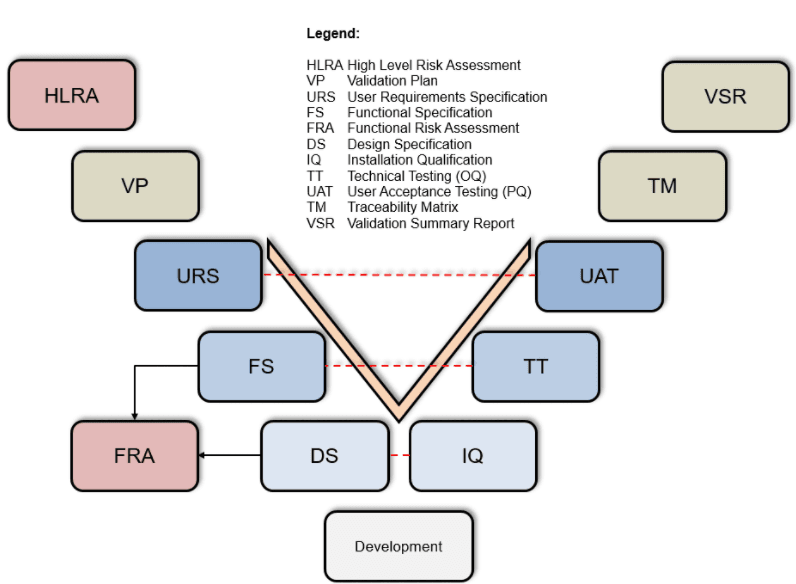
Learn more: Computer System Validation and validation documentation.
Global UDI SAP Add-on, Global Submission Portal, validator or XML bulk upload?
The offerings address different tasks. Data source, structure, authorities, record relationships, submission frequency, validation needs and the preferred operating model determine the choice, not a rigid volume threshold.
| Solution or process | Suitable starting point | Primary purpose |
|---|---|---|
| Global UDI SAP Add-on | Product and UDI data need to be managed and approved in SAP. | Master/plug-in data management, validation, roles, workflow, audit trail and customer-initiated electronic submission. |
| Global Submission Portal | Structured data needs to be imported, pre-validated and submitted to multiple target systems through a browser-based portal. | Data import, validation, submission workflow, status and authority feedback without primarily SAP-centred maintenance. |
| UDI Excel Cloud Validator | Prepared Excel data needs spreadsheet-based checks before the next process. | Display errors and warnings and provide a validation report; the validator does not perform submission. |
| Manual EUDAMED XML bulk upload | Europe IT is to validate customer data, generate the required EUDAMED XML files and submit them individually through the designated upload process. | File-based project and submission process, distinct from M2M in both workflow and technology. |
No SAP system?
Then Global UDI SAP Add-on is not automatically the right choice. Depending on your data source, the Global Submission Portal, UDI Excel Cloud Validator or an Excel/XML-based project process may be more suitable.
Assess an Excel-based solution
For structured UDI data without SAP integration.
Use UDI data for SAP label management
UDI data management and product labelling are closely related. Global UDI SAP Add-on and OPAL label management can be integrated so that suitable product and UDI information already maintained is available for the agreed labelling process. The data, checks and approvals to be handed over are defined in the integration project.
Global UDI SAP Add-on product demo: UDI data management and submission from SAP
Global UDI SAP Add-on combines the reuse of existing SAP master data with authority-specific plug-ins. UDI data is validated, versioned and approved in a controlled workflow; the customer then initiates submission directly in Global UDI SAP Add-on. The transmission service operated by Europe IT handles the relevant technical M2M route, while status information and authority feedback return to Global UDI SAP Add-on. The videos demonstrate selected capabilities of this end-to-end process.
Global UDI SAP Add-on
A concise introduction to SAP-integrated data management with the Global UDI Master, authority plug-ins, validation, versioning and approval.
Global UDI SAP Add-on: data, workflows and authority processes
See how one central SAP solution brings together UDI data maintenance, role-based approval, customer-initiated submission, status information and authority feedback.
Frequently asked questions about the Global UDI SAP Add-on
Short answers to technical, business and organisational questions about UDI data management and submission from SAP.
What is Global UDI SAP Add-on?
The Global UDI SAP Add-on (GUDI) is SAP-integrated UDI software from Europe IT Consulting GmbH. Companies manage UDI data in SAP, add authority-specific information, validate and approve records, and track regulatory submissions and authority feedback within their SAP working environment.
What is maintained in the Global UDI SAP Add-on master and in the authority plug-in?
Shared UDI data is maintained in the Global UDI Master. In each plug-in, the user adds the extra information required by the respective target system or reporting process. Shared data is therefore reused while regulatory differences remain separate.
Who initiates submission from Global UDI SAP Add-on?
The customer’s authorised user selects the target authority and approved records in Global UDI SAP Add-on and starts submission there. No switch to an additional customer portal is needed.
Who operates the technical connection to the authority?
Global UDI SAP Add-on passes the designated submission dataset through an outbound connection to the web service or gateway operated by Europe IT. This service handles the authority-specific technical communication. The respective authority remains responsible for operating and ensuring availability of its own database.
What does “submit directly from Global UDI SAP Add-on” mean?
“Directly from Global UDI SAP Add-on” describes the user workflow: the customer stays in Global UDI SAP Add-on, initiates submission there and sees status and responses there. It does not mean an immediate network connection from the SAP instance to the authority database without the Europe IT transmission service.
Is Global UDI SAP Add-on just an M2M interface?
No. Global UDI SAP Add-on is the SAP-integrated working solution for UDI data management, master and plug-ins, validation, versioning, permissions, approvals, audit trail and submission. M2M is the automated technical system-to-system route within the transmission process.
Do all Global UDI SAP Add-on authority modules use the same transmission protocol?
No. M2M is the shared umbrella term for automated transmission. Data formats and transport protocols are authority-specific. In the illustrated Global UDI SAP Add-on process, EUDAMED uses AS4; HL7 SPL and AS2 are provided for FDA GUDID.
How does Global UDI SAP Add-on validate UDI data?
Global UDI SAP Add-on checks data against the rules and structures configured in the master or installed authority module. Detectable errors are displayed in the interface. Validation supports data quality but does not guarantee final acceptance or publication by the authority.
How does the approval workflow work?
Prepared records enter a configured workflow. The designated roles or departments can approve or reject them. During the workflow, data is locked for normal editing; after rejection it can be corrected.
What is the difference between workflow history and audit trail?
Workflow history shows process stages such as UDI relevance, version creation, approvals and submission status. The audit trail documents specific field changes with old value, new value, user and timestamp.
Can Global UDI SAP Add-on display status and authority feedback?
Yes. In addition to internal processing and approval statuses, Global UDI SAP Add-on can retrieve and display transmission status and responses from the connected authority system.
Who handles data errors and initiates resubmission?
The customer handles substantive data errors within their Global UDI SAP Add-on process. After correction and the required approvals, the customer initiates resubmission in Global UDI SAP Add-on.
Can Global UDI SAP Add-on import UDI data from Excel?
Yes. Alongside manual Fiori maintenance, module-specific Global UDI SAP Add-on Excel templates can be used for migration and bulk data maintenance. Imported content is then validated and approved within the Global UDI SAP Add-on process.
Is a Global UDI SAP Add-on Excel file the same as XML bulk upload?
No. The Global UDI SAP Add-on Excel template is for data maintenance or migration within Global UDI SAP Add-on. In manual EUDAMED XML bulk upload, Europe IT validates the customer’s supplied data, generates the required XML files and uploads them individually through the designated authority interface.
Which authority plug-ins does Global UDI SAP Add-on support?
Global UDI SAP Add-on modules include EUDAMED UDI, swissdamed, FDA GUDID, TGA AusUDID, NMPA China and ÜTS Türkiye. Additional regulatory modules or plug-in variants are envisaged for EUDAMED Vigilance, FDA eMDR and SFDA Saudi Arabia. Specific features and current availability are confirmed for each project.
Does Global UDI SAP Add-on run on SAP S/4HANA and SAP ECC?
Global UDI SAP Add-on is designed for suitable SAP S/4HANA and SAP ECC/NetWeaver 7.50+ landscapes and can be used in a suitable SAP S/4HANA private cloud landscape. Specific compatibility, release level and deployment model are checked against the existing landscape before the project starts.
How does Global UDI SAP Add-on differ from the Global Submission Portal?
Global UDI SAP Add-on focuses on SAP-integrated UDI data management with master data, plug-ins, versions, roles, approvals and submission. The Global Submission Portal is a browser-based solution for importing, pre-validating and submitting structured data to multiple authorities or modules. The choice depends on data source and operating model.
Further UDI information
UDI systems worldwide
Overview of target markets, authorities and further specialist information.
Your contacts for the Global UDI SAP Add-on
Europe IT Consulting combines UDI expertise with SAP and software skills. The initial discussion covers data source, SAP landscape, authority modules, roles, migration, approval process and technical transmission method.


Assess the Global UDI SAP Add-on for your SAP landscape and target authorities
Tell us your SAP release level, required target authorities, current UDI data source and desired approval process. Together, we assess which Global UDI SAP Add-on plug-ins, data migrations, roles and technical transmission routes fit your landscape.