UDI · AUDIT TRAIL · CSV / CSA
UDI software: audit trails, data integrity and validation
Who changed the UDI data, who approved it and what was actually submitted? A reliable UDI process must provide traceable answers. An audit trail supports that evidence, but does not make software automatically compliant. Intended use, controlled procedures and appropriate checks within the organisation remain essential.
Trace changes. Assign approvals. Retrieve evidence.
What is an audit trail for UDI data?
An audit trail is a traceable history of relevant system actions and data changes. It helps identify users, timing, affected records and changes. Practical assessment should establish which events are recorded, how records are protected and how they can be reviewed.
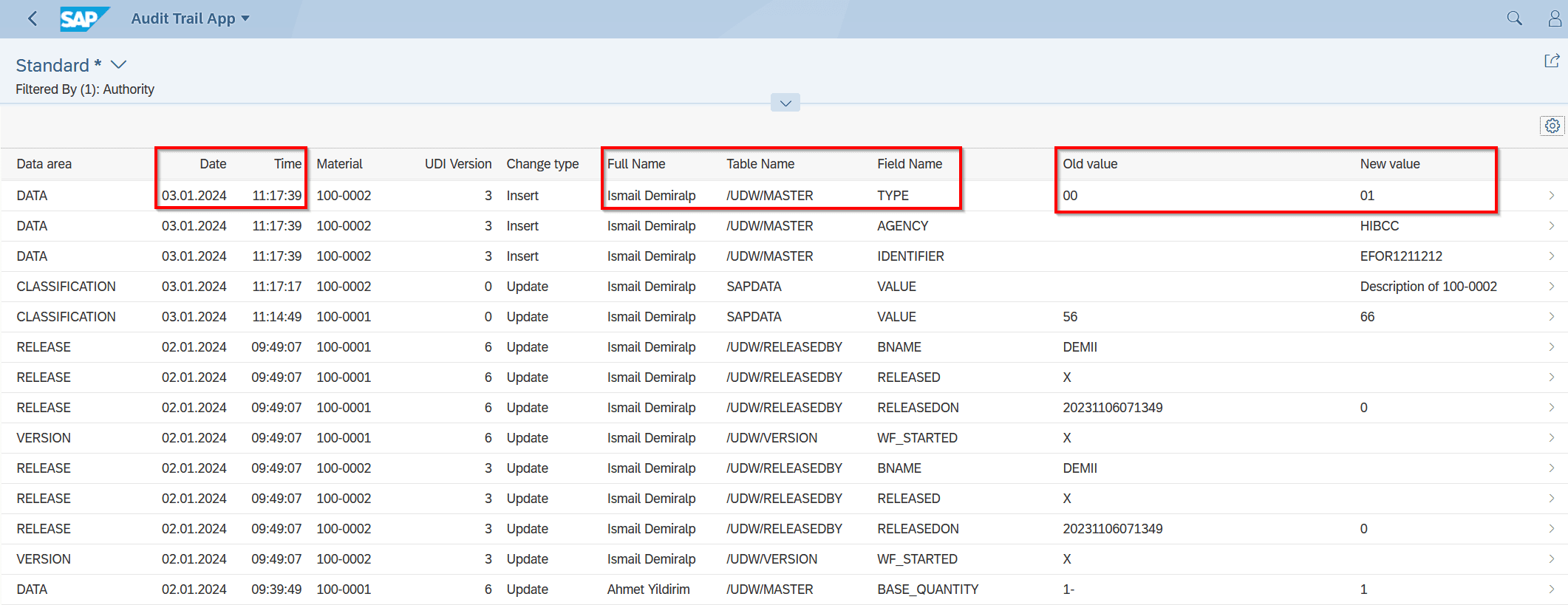
Existing SAP Audit Trail App view: it shows date, time, user, table/field name, and old and new values. The screenshot evidences this view, not all features of every current version or GSP module.
| Assessment question | Why it matters |
|---|---|
| Who made the change? | Distinct user attribution instead of indistinguishable shared accounts. |
| What changed? | Record, field and old/new value, or a documented scope of change. |
| When and in what context? | Time, version and connection to approval or submission. |
| Is the history protected? | Assess permissions, retention and access to records. |
| Is it actually reviewed? | Define review, deviation handling and retrieval. |
Four different kinds of evidence — not one green tick
Data validation
Does the record satisfy required fields, formats and applicable business rules?
System validation / assurance
Does the configured process work reliably for its intended use?
Audit trail
Which relevant changes and actions are recorded?
Submission evidence
Which version was submitted, and what response was received?
Plan CSV and software assurance according to risk
FDA’s Computer Software Assurance for Production and Quality Management System Software, February 2026, describes a risk-based approach for production and quality-management software. It supersedes the September 2025 version. Assess its specific scope; it does not prescribe identical test documentation for every UDI application.
FDA: Software Assurance, February 2026
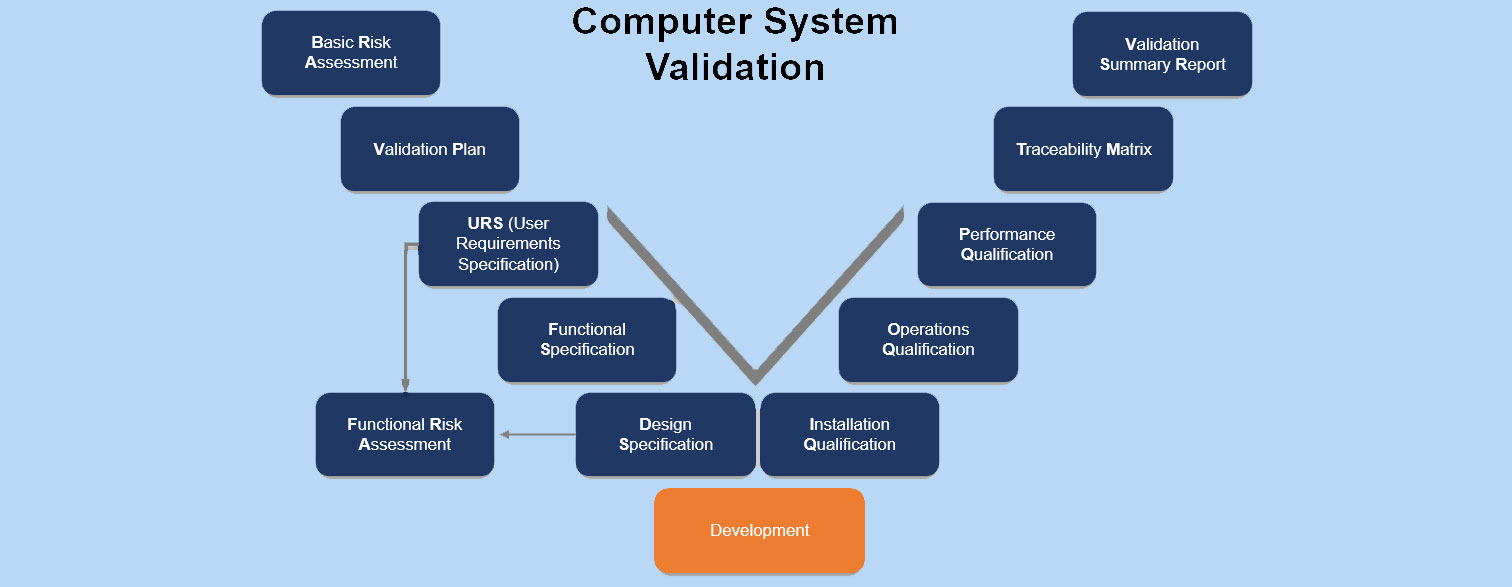
GAMP 5, second edition, provides risk-based lifecycle guidance; it is not a regulatory product certificate. The existing V-model illustrates possible documentation and testing relationships. Suitable coverage depends on use, risk and changes.
When is 21 CFR Part 11 relevant?
Applicability depends on the electronic records involved and the underlying FDA requirements. For covered closed systems, § 11.10 addresses validation, access controls and protected, time-stamped audit trails, among other controls. Processing UDI data alone does not make Part 11 applicable.
FDA: Part 11 scope and application · 21 CFR 11.10: controls for closed systems
GDPR, HIPAA and SOX likewise cannot be presented as identical blanket audit-trail obligations for every UDI project. Assess legal basis, data types and organisational context separately.
Software functionality and organisational procedures work together
Europe IT / agreed deliverables
Provide system functionality, data and submission processes and project-specific technical information within the agreed scope. Do not assume an unagreed complete validation-documentation package.
Customer / process owners
Define intended use, requirements, roles, approvals, testing and review within the organisation’s quality management. In the confirmed GSP/GUDI workflow, customers handle data errors and resubmissions.
Authority
Process submitted data according to its own rules and provide responses. Acceptance of a submission does not demonstrate every internal process control.
GUDI and GSP in the right evidence context
GUDI is the SAP solution for UDI data management and authority submission. GSP supports a portal workflow with Excel import, validation and customer-initiated transmission. Available logs, histories, exports and documentation must be checked against the relevant module and agreed scope.
A good project start connects data source, Europe IT solution, technical transfer method and operating model with clear responsibilities. This helps plan evidence without confusing data checks, system validation and authority acceptance.
Frequently asked questions
Is an audit trail automatically an electronic signature?
No. Change logging and electronic signatures are different functions. Determine whether signatures are needed and which requirements apply to the process.
Does an error-free UDI record prove system validation?
No. Successful data checks alone do not establish that roles, approvals, interfaces, error handling and operating procedures have been tested for intended use.
Is a screenshot complete audit evidence?
No. It can document a view. Complete evidence requires the relevant context, record or process and suitable retrievable records.