EUROPE IT · AUSUDID EXCEL TEMPLATE
Prepare UDI data for AusUDID — with a clear Excel structure
One main worksheet. Five supplementary data areas. A traceable starting point for your submission.
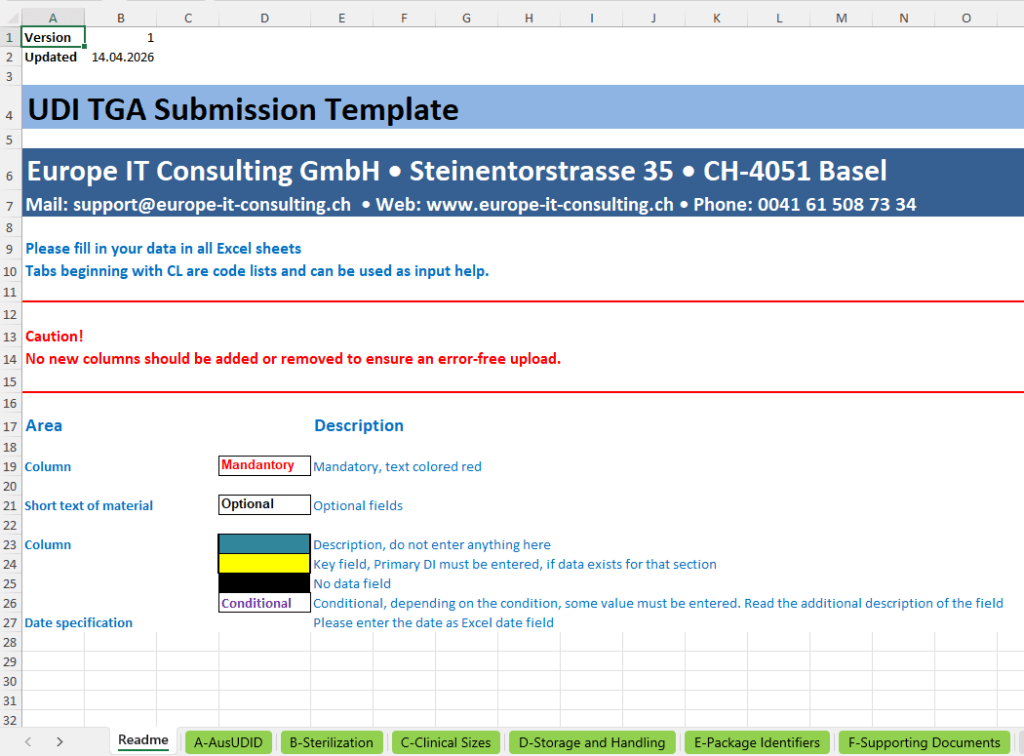
The AusUDID Excel Template from Europe IT Consulting is a workbook for the structured preparation of UDI product data for the Australian market. It brings identifiers, product characteristics, packaging relationships and other information together in defined worksheets.
The template supports data collection. Validation, conversion where needed and the actual transmission to authorities are separate steps in the agreed Europe IT process. A completed Excel file is not yet a published AusUDID record.
Request the template and process details → · View worksheets
Europe IT template ≠ official TGA bulk upload file
This page describes our template and its data structure. Direct Excel upload to the TGA portal uses a separate official workbook with a different worksheet structure. The two files are not interchangeable without checking. Official TGA instructions and bulk template.
Before filling in: clarify data sources and responsibilities
Use existing product data from Excel, ERP, SAP or your master data system. Information already maintained for other UDI markets can provide a valuable foundation. Field mapping, terminology and Australian additions still need to be checked.
- Define products and identifiers: Which Primary DIs and associated packaging levels will be processed?
- Involve responsible parties: Who supplies manufacturer data, sponsor-related information and ARTG mappings?
- Complete worksheets purposefully: Not every additional detail applies to every product. Do not fill conditional fields with arbitrary placeholders.
- Select the transmission method: The required processing depends on the selected submission process.
Our TGA AusUDID overviewexplains general deadlines and roles. This page focuses on the workbook.
Does the template fit your source data?
Tell us your data source, the intended products and whether you already work with an Australian sponsor. We can then align the template and next processing step appropriately.
Request the AusUDID Excel template
A · AusUDID: product data and identifiers
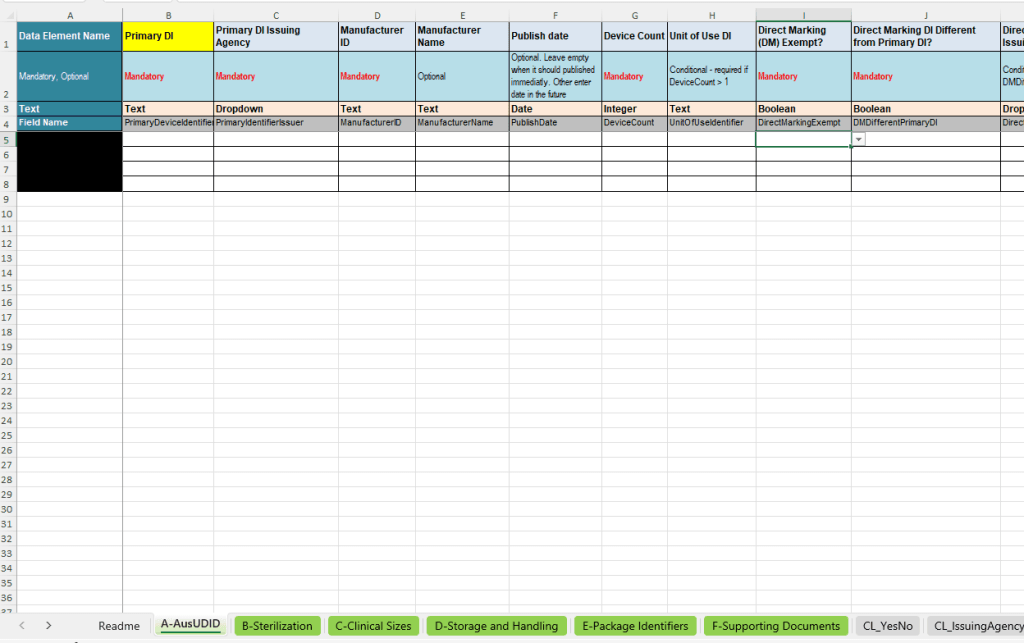
The main worksheet connects the Primary DI to device information. The other worksheets reference this identifier for related supplementary details. This keeps master data and repeatable information organised.
Which information is prepared?
- Identification: Primary DI, issuing agency, manufacturer ID and name; secondary or previous identifiers where applicable.
- Product description: Brand, model or version, description, device class, GMDN reference and software, SaMD or kit details where applicable.
- Use and safety: Single use or reuse, MRI information, latex, sterility and sterilisation before use.
- UDI relationships: Device Count, Unit of Use DI where applicable, direct marking, exemptions and a different Direct Marking DI.
- Market context: ARTG ID, catalogue details and sponsor-related distribution end information, according to the responsible role.
- Production identification: Information about which PI types are used. This is not a list of all actual serial or batch numbers.
Important for the “Publish date” field: The older worksheet image shows this field as an input option. This does not establish that every transmission method supports a freely selectable publication date. M2M is subject to the specifics of the current TGA implementation. TGA: HL7 SPL specification and differing data fields.
The workbook makes the data structure tangible. Regulatory data requirements depend on the specific case and the current TGA data fields.
Questions about identifiers or data mapping?
B · Sterilisation before use
The “Sterilization” worksheet links the intended sterilisation methods to the Primary DI. The field logic shown concerns products identified in the main worksheet as requiring sterilisation before use.
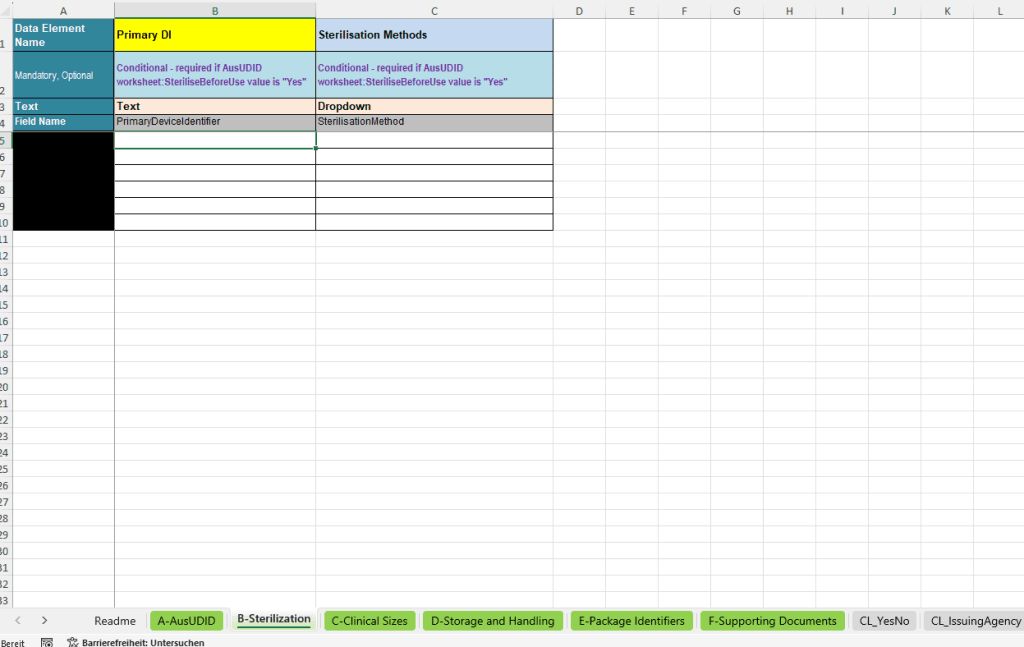
Depending on the applicable code list, relevant methods may include steam, ethylene oxide, dry heat, gamma or electron beam irradiation and hydrogen peroxide processes. Select the method intended for the specific product from the appropriate list instead of inventing a new label.
Practical check: Do not equate “supplied sterile” with “to be sterilised before use”. Check that your combination of values reflects the actual product characteristics.
C · Clinical sizes and dimensions
The “Clinical Sizes” worksheet structures clinically relevant sizes. The columns shown distinguish Primary DI, Clinical Size Type, Unit of Measure, Numerical Value and Device Size Text.
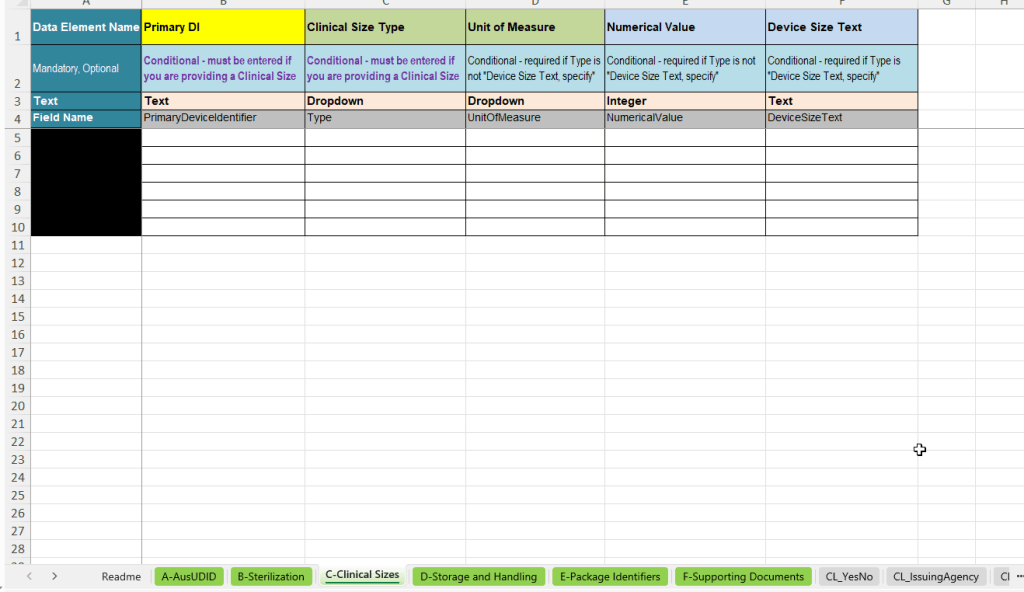
This makes it clear whether information is held as a numerical value with a unit or as the designated text description. A number alone is often ambiguous without the size type and appropriate unit.
Practical check: Do the unit and meaning match? Are additional rows linked to the correct Primary DI? Check decimal notation and formatting before further processing.
Request help structuring your product data
D · Storage and handling
“Storage and Handling” links storage and handling conditions to the product. The worksheet includes type, unit, lower and upper values and a field for special conditions.
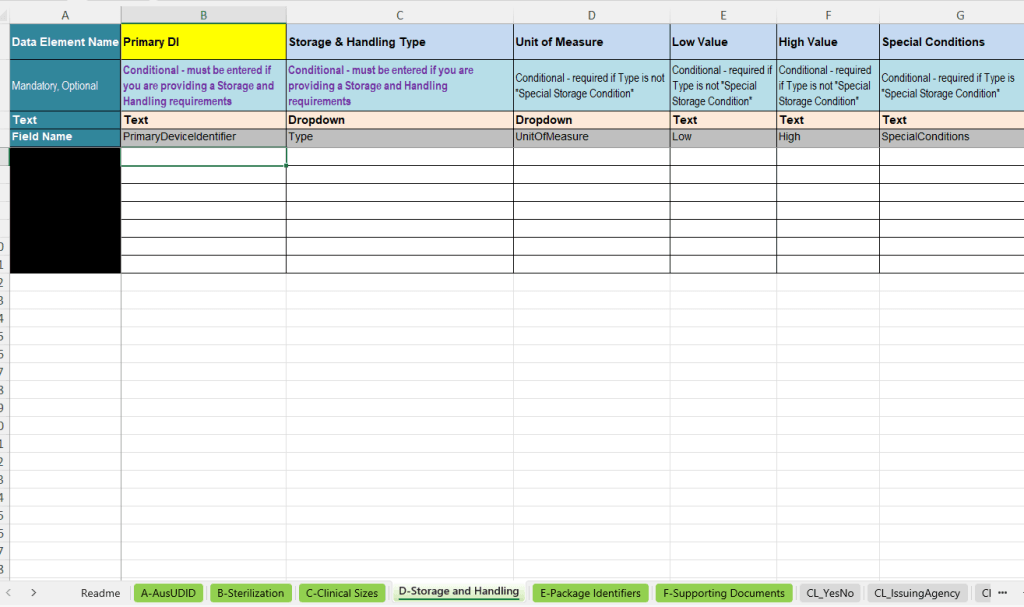
This allows limit ranges to be prepared separately from supplementary text. Where special storage conditions are recorded as text, their content must match the intended category and your product documentation.
Practical check: Do not confuse minimum and maximum values or use units incompatible with the selected condition. Deliberately distinguish empty fields from entries such as “not applicable”.
E · Packaging identifiers and hierarchy
The “Package Identifiers” worksheet holds additional packaging information. Alongside Primary DI, it records Package DI, Package Type, Quantity and Contained Item Identifier. The structure shown also includes the sponsor-related distribution end date for packaging where relevant.
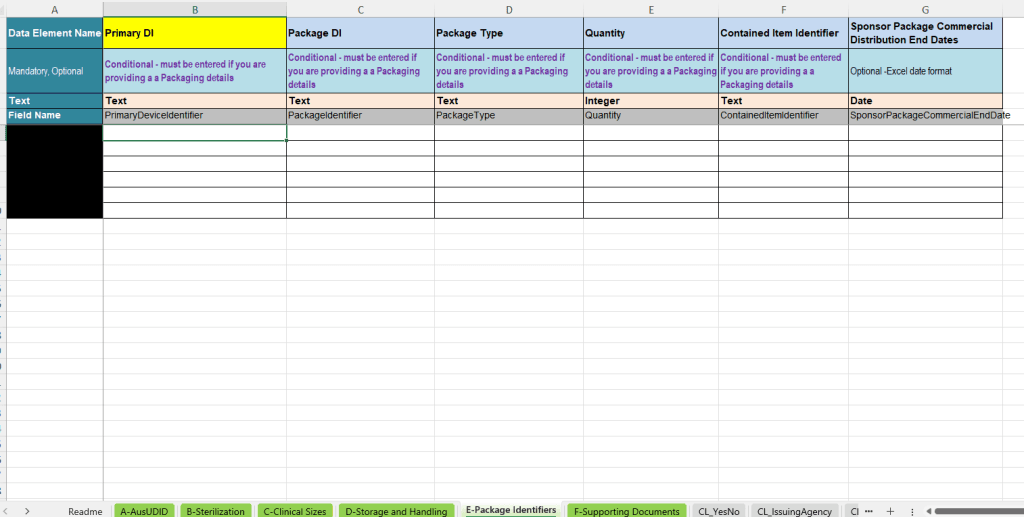
The relationship is essential: A packaging identifier alone does not explain which level it contains or in what quantity. The Contained Item Identifier links to the contained unit.
For multiple packaging levels, check each relationship individually. Make sure the identifiers used exist and quantities describe the actual packaging structure. This prevents avoidable queries during mapping and checks.
Discuss your packaging structure for AusUDID
F · References to supporting documents
“Supporting Documents” prepares document references. The structure shown links Primary DI, Related ARTG ID, Document Type and Document URL. Depending on the use case, this may include references to instructions for use or patient information.
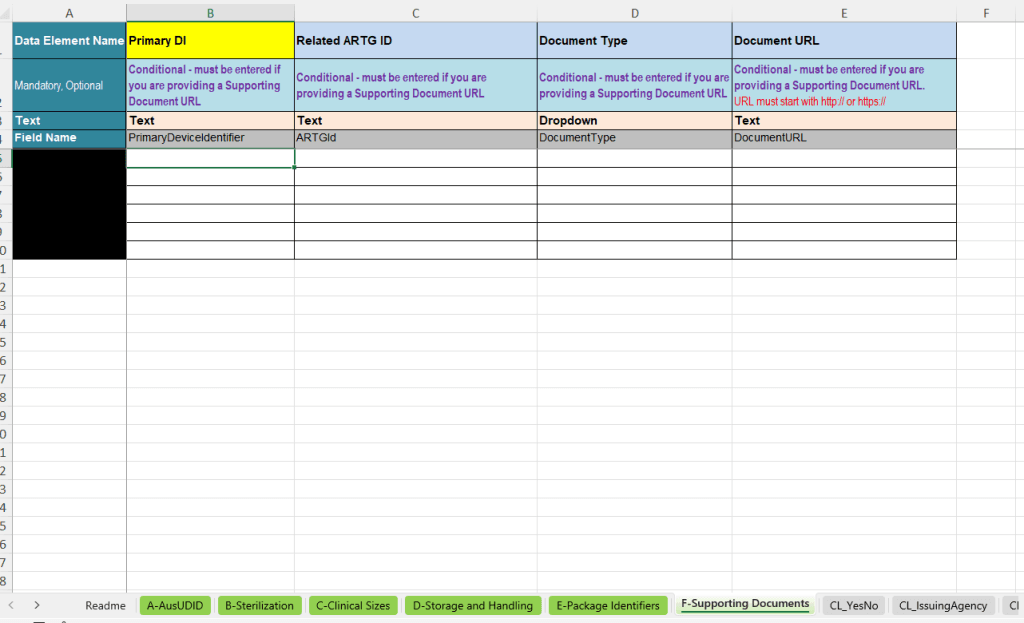
This concerns structured URLs and their mapping, not the automatic regulatory review of every document. A link must match the correct product, applicable ARTG mapping and selected document type.
Practical check: Is the link accessible and suitable long-term? Does it lead to the correct document rather than a general website? Are the version and language appropriate for the intended purpose?
Readme and code lists: capture correctly instead of repairing later
The Readme explains the structure and field markings. Red labels mark mandatory entries; other fields may be optional or conditional. Primary DI is the linking key for related worksheet data.
- Do not independently add, delete or rename columns.
- Do not overwrite description or guidance rows with product data.
- Maintain dates as actual Excel date values where the field requires this.
- Transfer identifiers without unintended reformatting; check leading zeros in particular.
- Use the designated CL code lists and do not replace their values with differing free text.
The workbook includes input aids for yes/no values, issuing agencies, device classes, sterilisation methods, size and storage units, software, MRI and document information. These selection aids do not replace full validation of all relationships and authority rules.
File and release: The template is described as an .xlsx workbook with one main and five supplementary worksheets. Suitable Excel version, required features and update status are agreed for use. The images alone do not establish tested compatibility with every spreadsheet application.
Clarify the template release and use in your process
From workbook to AusUDID submission
- Prepare data: Complete the appropriate template and clarify responsibilities for content.
- Validate: Check data in the agreed Europe IT process; the customer corrects identified content errors.
- Prepare transmission: Align the target module, permissions and required technical preparation.
- Submit and track: Trigger transmission, check status and authority feedback, and resubmit when necessary.
In the Global Submission Portal , the customer uploads the completed template. After successful automatic validation, the customer triggers transmission. For UDI data already maintained in SAP, GUDI with the appropriate authority module is a separate solution path; an additional intermediate Excel step is not universally required.
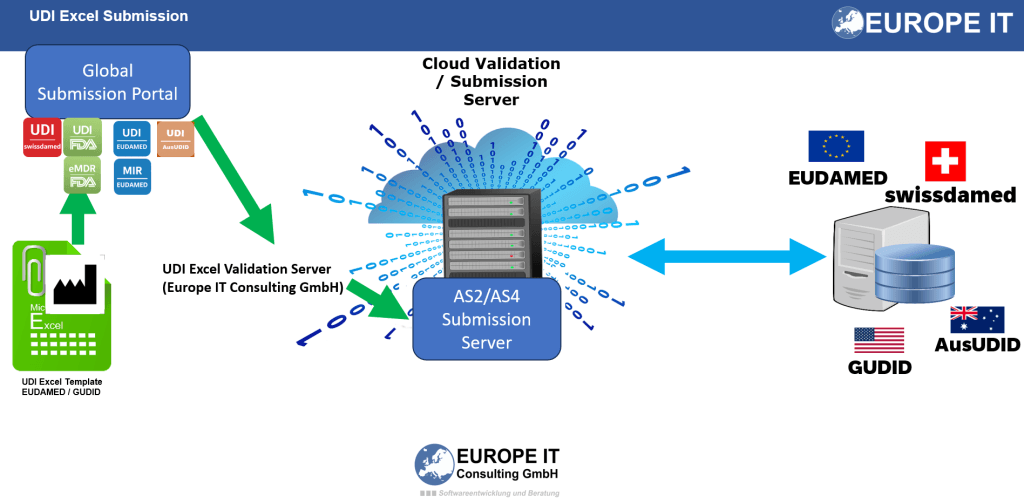
The graphic shows the overall relationship. The conversion and transmission method included in a specific engagement are agreed separately. Overview of UDI submission services.
Questions about the Europe IT AusUDID template
Can I upload the template directly to TGA?
This is not promised for this Europe IT workbook. For direct TGA bulk upload, use the designated official file. Our template focuses on structured data preparation and the agreed Europe IT process.
Does the Excel file itself generate a complete HL7 SPL message?
No such export function is promised here. The workbook, technical preparation and transmission to authorities are separate components.
Can I reuse EUDAMED or FDA data?
Existing source data can be transferred and mapped if the content and identifiers match. Australian fields, sponsor context and ARTG mapping require additional checks. An existing submission in another country does not replace this step.
Does an error-free template guarantee acceptance?
No. Input aids and process validation reduce avoidable errors. The authority processes submissions under its own rules and may generate feedback requiring specialist handling.
Your data should not just look complete — it should work in the submission process. Talk to us about the template, validation and transmission.
Editorial source check: 4 September 2026. Images show the existing template release and are not a complete current TGA field specification.
