SAP INTERACTIVE FORMS BY ADOBE
Form development with SAP Interactive Forms by Adobe ©
From visual layout through interactive and offline forms to labels, barcodes, ADS configuration and a central print strategy.
TECHNOLOGY & EXPERIENCE
Adobe Forms as an SAP form technology
SAP Interactive Forms by Adobe was introduced in 2005. SAP ECC 6.0 EHP4 already included more than 2,500 Adobe forms delivered by SAP. Many organisations use the technology to evolve or replace existing SAPscript and Smart Forms solutions.
Adobe Forms is a central form technology in SAP S/4HANA landscapes. The suitable variant, output service and output-management approach depend on the specific S/4HANA deployment and output scenario.
According to its project history, Europe IT Consulting has supported development with Adobe LiveCycle Designer and its technical integration into SAP since 2007.
The technical chain of an Adobe form
SAP data
Application, print program, form interface and context provide the required data.
Form layout
Master pages, content areas, tables, conditions and barcodes implement the document logic.
Adobe Document Services
ADS processes the form template and data for the intended output.
Document & channel
PDF, print, email, archiving or an agreed interactive process.
BENEFITS OF ADOBE FORMS
Layout, translation and output in one form solution
WYSIWYG editor
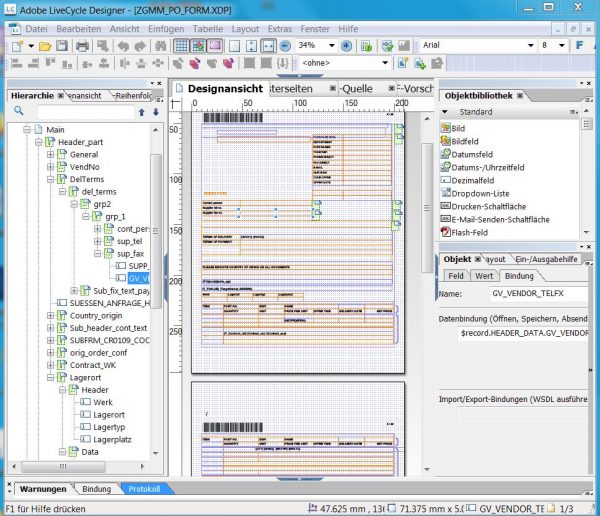
Adobe LiveCycle Designer simplifies the visual creation and adaptation of form layouts.
Data and layout separated
The clear separation supports fast onboarding and a clean division of responsibilities.
Straightforward translation
Form texts and language variants can be maintained systematically with SAP tools.
Local PDF storage
Depending on the process, the generated document can be provided or stored locally as a PDF.
Email from SAP
PDFs can be sent directly from SAP as attachments and combined into a single file when required.
Archiving
Print output can be integrated into an agreed SAP archiving process.
FORM DEVELOPMENT
Support from the form idea to productive print output
Experienced form developers connect SAP data provision, layout, output and print technology so the form fits the business need and works reliably in the productive process.
Form types and migration
- ◆Development of standard print forms with Adobe Forms
- ◆Development of interactive Adobe Forms
- ◆Embedding Adobe Forms in Web Dynpro applications
- ◆Development of interactive offline Adobe Forms
- ◆Labels for Zebra and other label printers
- ◆Migration from SAPscript and Smart Forms to Adobe Forms
INDUSTRIAL REQUIREMENTS
Fonts, barcodes and tray control
- ✓Use of the OCR-B font
- ✓EAN barcodes and 2D codes such as DataMatrix and QR Code
- ✓Tray control for multipart or form-specific print output
CONFIGURATION & PRINT STRATEGY
ADS, SAP instances and reuse
- ✓Selection of the Adobe Document Services and Designer setup that fits the SAP system
- ✓Configuration and connection of ADS to the existing SAP instances
- ✓Setup and verification of the RFC connection, including transaction SM59
- ✓A central Adobe Forms print strategy and a reusable ABAP framework
Corporate design and central data determination belong together
Adobe forms should do more than reproduce the organisation’s corporate design. A central data-determination strategy also provides recurring content consistently, including the address, logo and appearance of the form header as well as contact and bank details in the footer.
RELATED TECHNICAL ARTICLE
Pitfalls when introducing SAP Interactive Forms by Adobe
Guidance on typical technical and organisational pitfalls during an implementation.
Primary technical source
SAP Help: SAP Interactive Forms by Adobe
SAP describes the solution, its integration and the processing of form templates through Adobe Document Services.
YOUR ENQUIRY
Which form should we implement for you?
Send us a sample form plus details of the SAP release, output channel, languages, printers, ADS situation and the planned migration or new development.
