EUROPE IT CONSULTING · SAP ADD-ON
SAP Barcode Generator for GS1 DataMatrix and GS1-128
Generate GS1 barcodes directly in SAP and embed them in your forms – for digital documents and printed labels.
The ABAP add-on from Europe IT Consulting generates barcodes as BMP graphics. Embed the output in Adobe Forms, Smart Forms or SAPscript. The barcode is already part of the generated document, including PDFs sent by email.
What the SAP Barcode Generator does
Need to turn product, batch or serial information from SAP into barcodes? The add-on connects barcode generation with your existing form processing. Generating the barcode does not require a separate external barcode web service.
Generate
GS1 codes from SAP data
Use GTINs, batches, serial numbers and dates as the data for the required barcode.
Embed
A graphic for your form
Call the generator during processing and pass the barcode to the SAP form as a BMP graphic.
Output
PDFs and labels
Include barcodes in the digital form and print them through the configured output process.
From SAP data to a barcode in your form
Barcode content, human-readable text and output are configured as a connected workflow.
-
SAP data
Provide the required product and production data in the print program or form interface.
-
Barcode and HRI
Build the data structure, assign Application Identifiers and generate the barcode and its readable representation.
-
SAP form
Place the graphic and HRI in the required position in Adobe Forms, Smart Forms or SAPscript.
-
PDF or label
Use the generated document digitally or print it; check the data and output with a representative example.
Adobe Forms, Smart Forms and SAPscript
The add-on generates the barcode as a graphic and can be called dynamically during form processing. For Adobe Forms, integration can take place in the print program or form interface. Europe IT supports data transfer and layout adjustments.
Your existing form and printing infrastructure remains relevant. For Adobe Forms, this includes the appropriate Adobe Document Services (ADS); for label printing, it includes resolution, scaling and the output device.
Which barcode types are available?
The standard scope includes GS1 DataMatrix and GS1-128. The add-on has a modular structure; additional barcode types and HIBC variants are agreed as part of the required functionality and delivery scope.
| Scope | Barcode types | Purpose |
|---|---|---|
| Standard | GS1 DataMatrix · GS1-128 | GS1 data with Application Identifiers in a 2D or linear barcode. |
| Further options | DataMatrix · Code 128 · QR Code · EAN-13 · Code 39 | For additional identification tasks; confirm the required types and available modules in advance. |
| Pharma / HIBC | Pharmacode / LAETUS Code · HIBC Code 128 · HIBC Code 39 · HIBC QR Code · HIBC DataMatrix | For the corresponding industry-specific data structures; assess the exact variant and intended use. |
GS1-128 was previously known as EAN-128 or UCC-128. Code 128 and GS1-128 are therefore not interchangeable: GS1 uses a defined data structure with Application Identifiers.
HRI, Application Identifiers and the test program
The included HRI generator supports the readable representation of the encoded data. HRI stands for Human Readable Interpretation: the human-readable text accompanying the barcode.
Typical GS1 data fields
- (01)
- GTIN
- (10)
- Batch or lot number
- (11)
- Production date
- (17)
- Expiration date
- (21)
- Serial number
Parentheses identify Application Identifiers in the human-readable text; the parentheses themselves are not encoded in the GS1 barcode. FNC1 and required separators are part of the technical encoding. They are not a visible substitute for HRI.
Test with your own examples
The included test report lets you check inputs and barcode results on screen. Test examples and an Adobe Forms print form support evaluation before integration into your production forms.
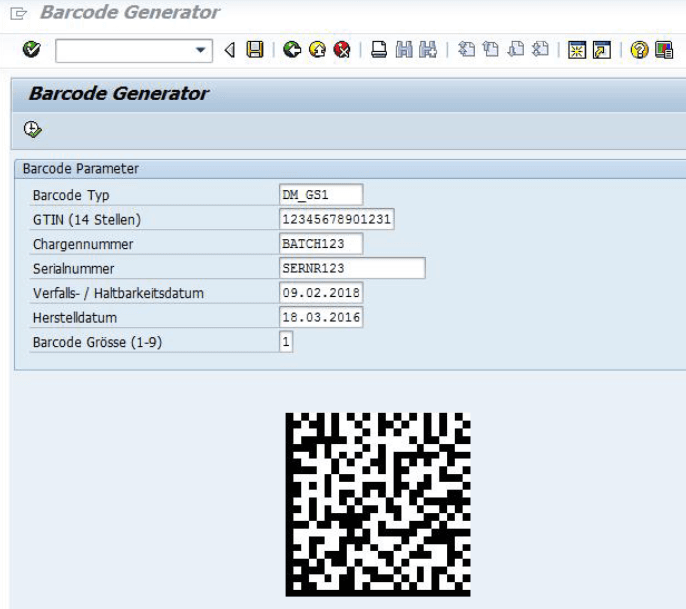
Acceptance testing should also cover long and variable field contents, PDF output and actual test prints. Alongside scanner readability, assess the applicable requirements for data structure and print quality.
Integration into your SAP landscape
Europe IT Consulting supports importing the add-on, transferring data in the print program or form interface, and adapting your forms. The setup is aligned with your output process.
-
Define requirements
Identify the SAP release and deployment model, form technology, barcode types, data fields and output media.
-
Connect a sample form
Integrate the add-on, prepare data and HRI, and place the barcode graphic in the form.
-
Review the output together
Test barcode content, readable text, PDFs and labels using your examples, then agree on the next implementation steps.
Frequently asked questions about the SAP Barcode Generator
Is the SAP Barcode Generator an online tool?
The product is an ABAP add-on for integration into your SAP landscape. It is designed to generate barcodes within your SAP and form processes. The historical S/4HANA article also shows a Fiori/UI5 preview in the browser.
Is the barcode visible in PDFs and documents sent by email?
Yes. The barcode graphic is embedded in the generated form and is therefore included in the resulting PDF. It is created during form processing. The specific output is tested with your form.
Do I need additional barcode hardware or an external web service?
For barcode generation, the add-on runs directly in ABAP. No external barcode web service is required for this step. Form processing and printing still depend on the relevant SAP, ADS and printer components.
Does the add-on work with every S/4HANA version?
The existing product article on S/4HANA 1809 does not establish approval for every release and deployment model. Tell us your release, deployment model and form technology so that we can assess suitability for your system.
How quickly can the solution be set up?
The effort depends on system access, the transport process, the required barcode types and form adjustments. A sample form provides a concrete basis for planning setup and testing.
Does the generated barcode cover all UDI labelling requirements?
Barcode generation is one part of labelling. Product data, label content, HRI, layout and print quality must also fit the intended use. Generating a barcode does not initiate registration with an authority.
How should your barcode be generated in SAP?
Tell us about your form or label process. Helpful details include the SAP version and deployment model, form technology, required barcode types, and a sample of the data and target form.
Together, we define the functionality, integration and appropriate tests for your use case.
GS1 terminology and technical background
Further primary sources on Application Identifiers, GS1 DataMatrix and barcode concepts in SAP:
